
A copilot beside the workflow is still the old workflow
Picture a procurement team reviewing suppliers.
The existing process starts with an intake form, moves through document checks, risk research, stakeholder questions, legal review, and a final decision. Information lives across email, spreadsheets, a contract system, and several browser tabs.
Now the product adds a copilot.
The copilot can summarise a supplier, draft a question, and explain a policy. Useful work, certainly. Yet the team still copies information between systems, wonders which version is current, chases approvals, and reconstructs context whenever ownership changes.
The AI helps with moments inside the workflow. It does not redesign the workflow.
This distinction matters because an agent can do more than generate content. It can gather context, choose tools, update state, coordinate steps, detect an exception, and ask for judgment. Once a system can participate in the work, the product is no longer only a set of screens. It becomes an operating model shared by people and software.
That is what I mean by an AI-native workflow: a workflow designed around the strengths, limits, and responsibilities of both humans and agents from the beginning.
It does not mean maximum autonomy. It does not require a swarm of agents. It does not turn every task into chat.
In fact, the most mature AI-native products often feel calmer than a copilot bolted onto every page. They make goals, state, ownership, evidence, exceptions, and commitments easier to see.
Anthropic draws a useful technical distinction between workflows, where models and tools follow predefined code paths, and agents, where a model dynamically directs its process and tool use. It also recommends increasing complexity only when the task justifies the extra cost and latency. Anthropic, Building effective agents
That distinction is architectural, but it creates a product-design question: where does the work need consistency, and where does it need judgment?
This guide offers 18 UX patterns for answering that question. They cover task definition, plan visibility, handoffs, exceptions, real-world actions, recovery, and the operational feedback loop.
What makes a workflow AI-native
An AI-native workflow has five qualities.
It starts from an outcome
The system knows what completion means. It does not merely wait for the next prompt.
It has inspectable state
People can see what has happened, what is active, what is blocked, and what will happen next.
It has deliberate boundaries
Data access, tool access, spending, communication, and irreversible actions are constrained by design.
It treats handoffs as interfaces
When work moves between an agent, another agent, and a person, the receiving party gets the context and authority needed to continue.
It learns from operation
Exceptions, corrections, overrides, and outcomes improve the workflow rather than disappearing into a chat transcript.
Microsoft’s human-centred guidance for agents makes a similar point: an agent experience should be designed as a complete interaction system across first use, active collaboration, correction, and recovery, not as an isolated prompt surface. Microsoft Learn, Human-centered design for agents
The practical shift is from designing individual interactions to designing the movement of work.
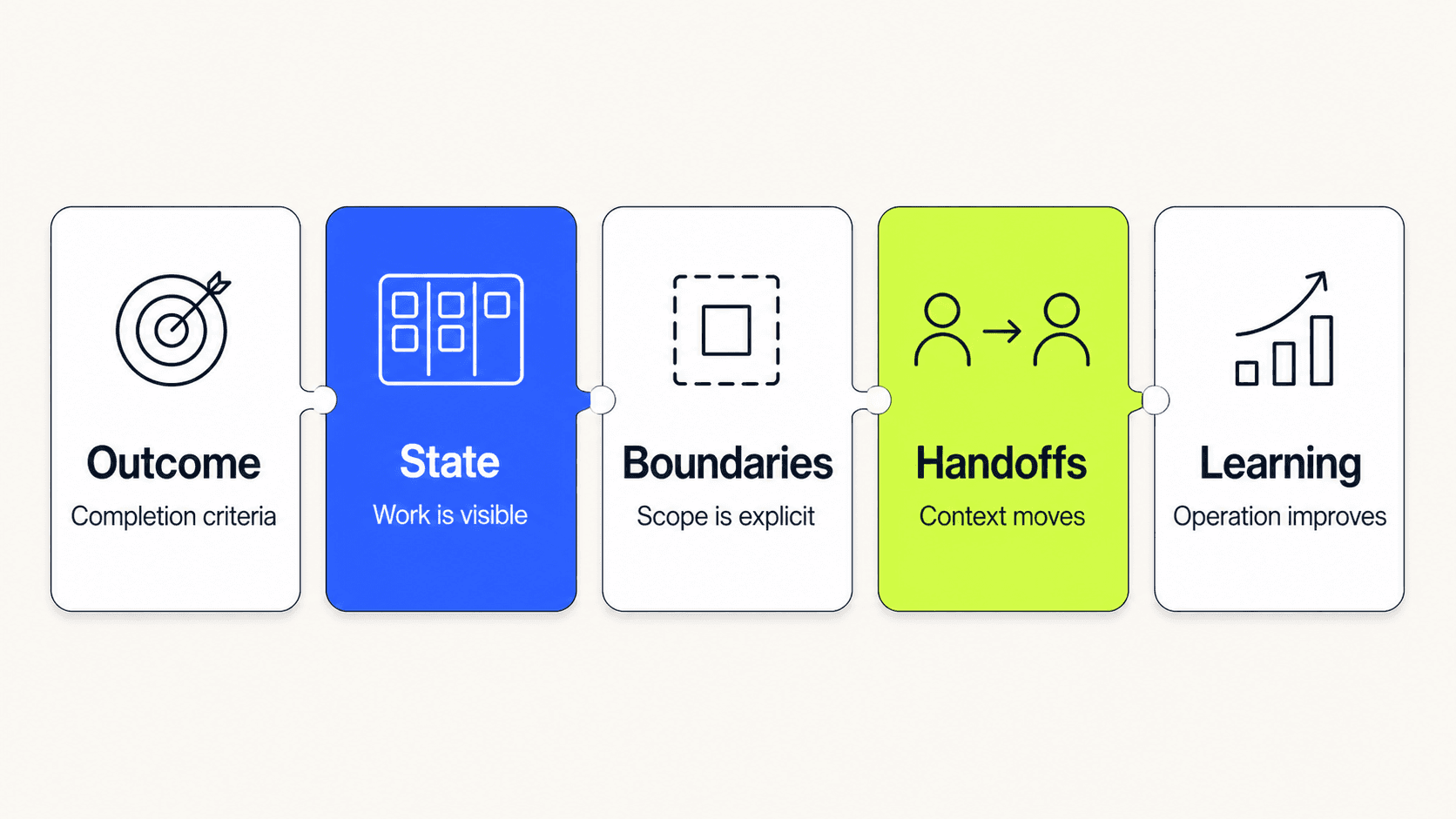
The unit of design is the movement from intent to outcome.
Start with the Job, Not the Chat Box
Before drawing an agent panel, map the job that needs to change.
Where does information enter? Which decisions require expertise? Which steps are repetitive but stable? Where does work wait? Which action creates a commitment outside the product?
This is normal service and workflow design, with one extra concern: the path is now partly adaptive.
Pattern 01 · Outcome brief
Define the result before defining the agent.
An outcome brief should state the user goal, completion criteria, relevant constraints, and the artefact or state that proves the work is done. “Help with supplier review” is too vague. “Prepare an evidence-backed supplier assessment for legal approval, without contacting the supplier” creates a usable boundary.
The outcome brief can appear as a compact task contract at the start of a run. Let the user edit it before work begins.
Pattern 02 · Work boundary
Show what is inside and outside the assignment.
Useful boundaries include permitted systems, permitted records, communication limits, time range, budget, and actions that always require approval. A user should not need to infer these from settings spread across the product.
The boundary belongs beside the goal because it changes the meaning of success.
Pattern 03 · Stable input contract
Separate required inputs from optional context.
Agents are good at working with incomplete and unstructured information, but that is not a reason to make every task ambiguous. Identify the minimum facts needed to begin reliably. Show which inputs are missing, which were inferred, and which can be gathered during execution.
A stable input contract reduces repeated clarification without pretending every workflow can become a rigid form.
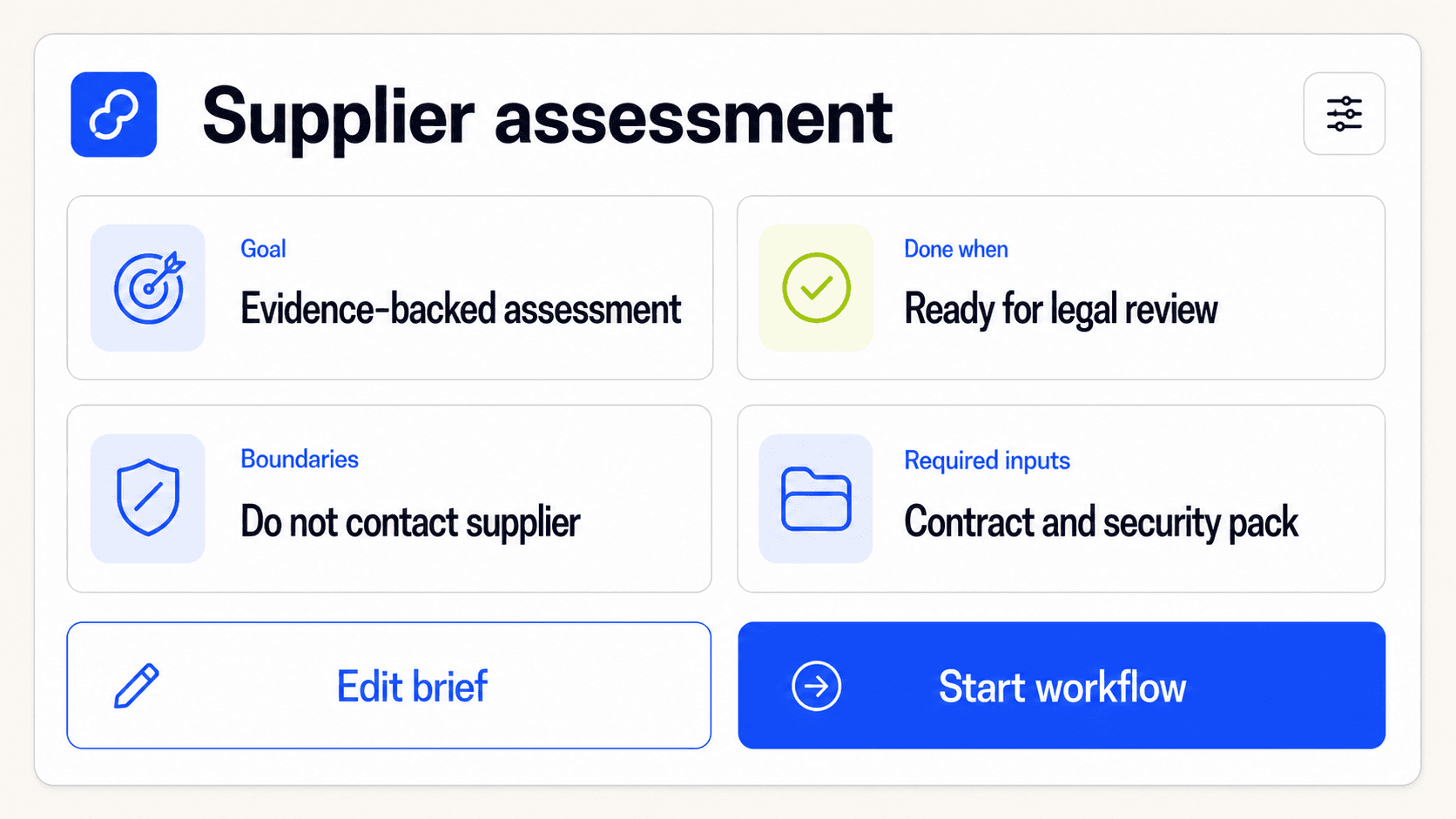
A good start turns an open-ended request into a visible agreement about the work.
Make the Work Legible
Traditional software exposes steps because people execute them. Agentic software can hide steps because the system executes them.
That can remove effort. It can also remove the cues people use to understand progress and notice trouble.
The answer is not to expose chain-of-thought or stream every tool call into a terminal. The interface should expose operational state: the parts of the work that help someone predict, steer, or recover the outcome.
Pattern 04 · Visible plan
Show the proposed route before execution when sequence, cost, or impact matters.
The plan should describe observable steps: gather contract documents, check policy, compare risk signals, draft assessment, request legal review. It should not claim to reveal private model reasoning.
Let people remove a step, narrow a source, or add a checkpoint before the run begins.
Pattern 05 · Checkpointed execution
Break long work into meaningful stages with saved state.
A checkpoint is more than a progress marker. It creates a place where the user can inspect an artefact, change direction, or resume after failure without repeating everything.
Good checkpoints follow changes in risk or ownership. Research completed, draft prepared, approval requested, and action committed are more useful than arbitrary percentages.
Pattern 06 · Explicit work state
Use a small, stable state model across the product.
For example: Ready, Active, Waiting, Needs review, Blocked, Completed, Stopped. Each state should explain who owns the next move and what will happen if nobody acts.
Avoid using “thinking” as a catch-all. A task waiting for access and a task actively using a tool are different product states.
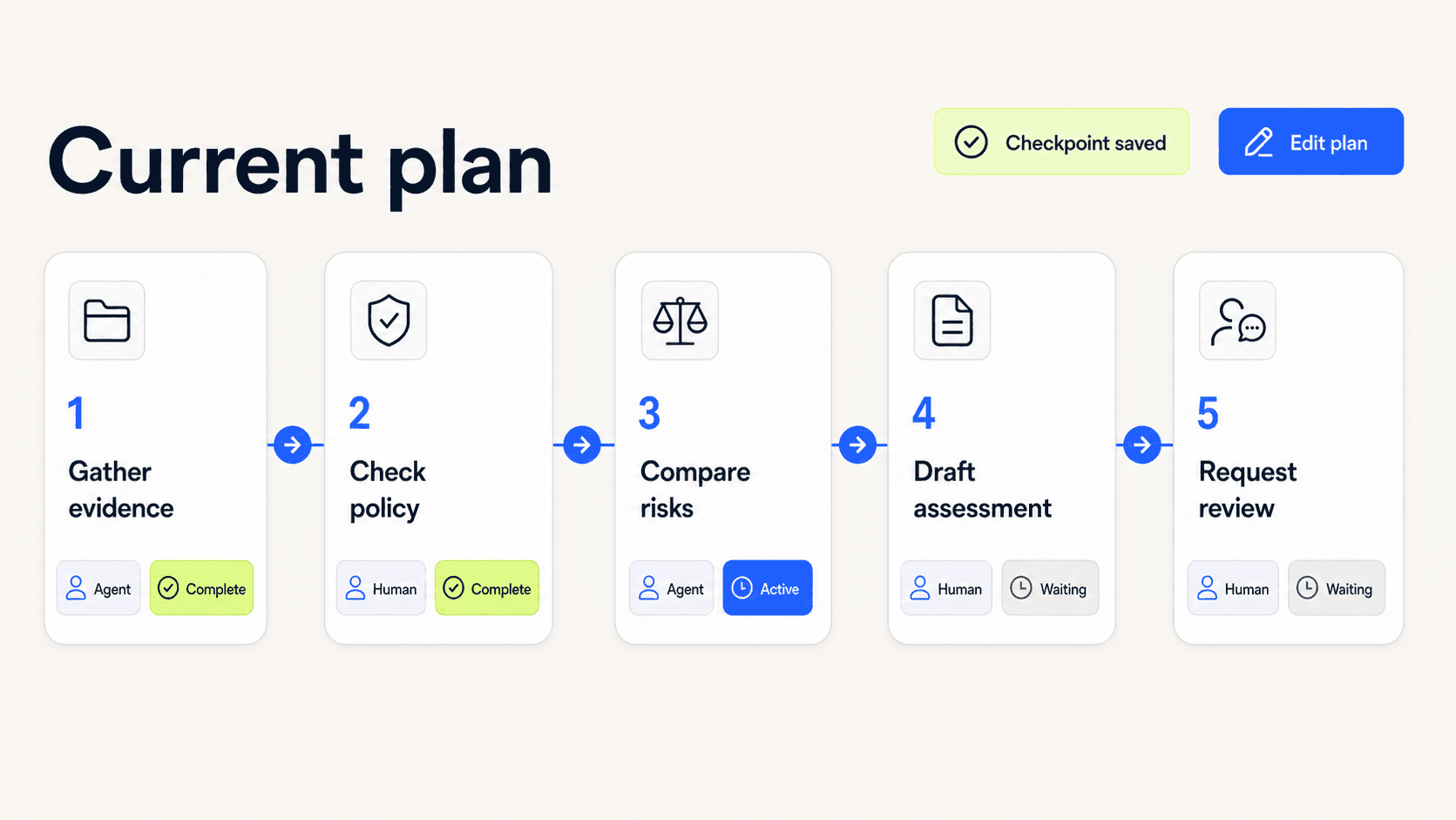
Progress is useful when it explains ownership, movement, and the next meaningful event.
Handoffs and Exceptions
Design handoffs as product moments
Workflows fail at the joins.
One agent hands a task to another without enough context. A person receives a review request with no explanation. The original requester gets a final answer but cannot tell which assumptions changed along the way.
OpenAI’s practical guide describes centralised manager patterns and decentralised handoffs between agents. Whichever architecture a team chooses, the user experience still needs a clear owner and a legible transfer of work. OpenAI, A practical guide to building agents
Pattern 07 · Artefact handoff
Transfer a reviewable work product, not merely a message.
A research agent might hand off a source pack. A planning agent might hand off a scoped plan. A support agent might hand off a case summary with unresolved questions.
The artefact gives the next participant something stable to inspect, correct, and reuse.
Pattern 08 · Context packet
Package the minimum context needed for the next role.
Include the goal, current state, decisions already made, evidence used, open questions, constraints, and the requested next action. Make sources linkable. Mark inferences as inferences.
More context is not automatically better. A concise packet reduces the need to read an entire history.
Pattern 09 · Ownership transfer
Make the change of responsibility explicit.
The interface should answer: who owns the work now, what are they expected to do, and when does ownership return? This matters for person-to-agent, agent-to-person, and agent-to-agent handoffs.
Use verbs that reflect responsibility: Review, Decide, Resolve, Continue. “Notification sent” says nothing about ownership.
Pattern 10 · Parallel work with synthesis
Use parallelism when tasks are genuinely independent, then design the merge.
Several agents may research legal, commercial, and security concerns at the same time. The product needs a synthesis step that shows agreements, conflicts, gaps, and the evidence behind the combined recommendation.
Without synthesis, parallel work creates a pile of outputs and moves integration back to the user.
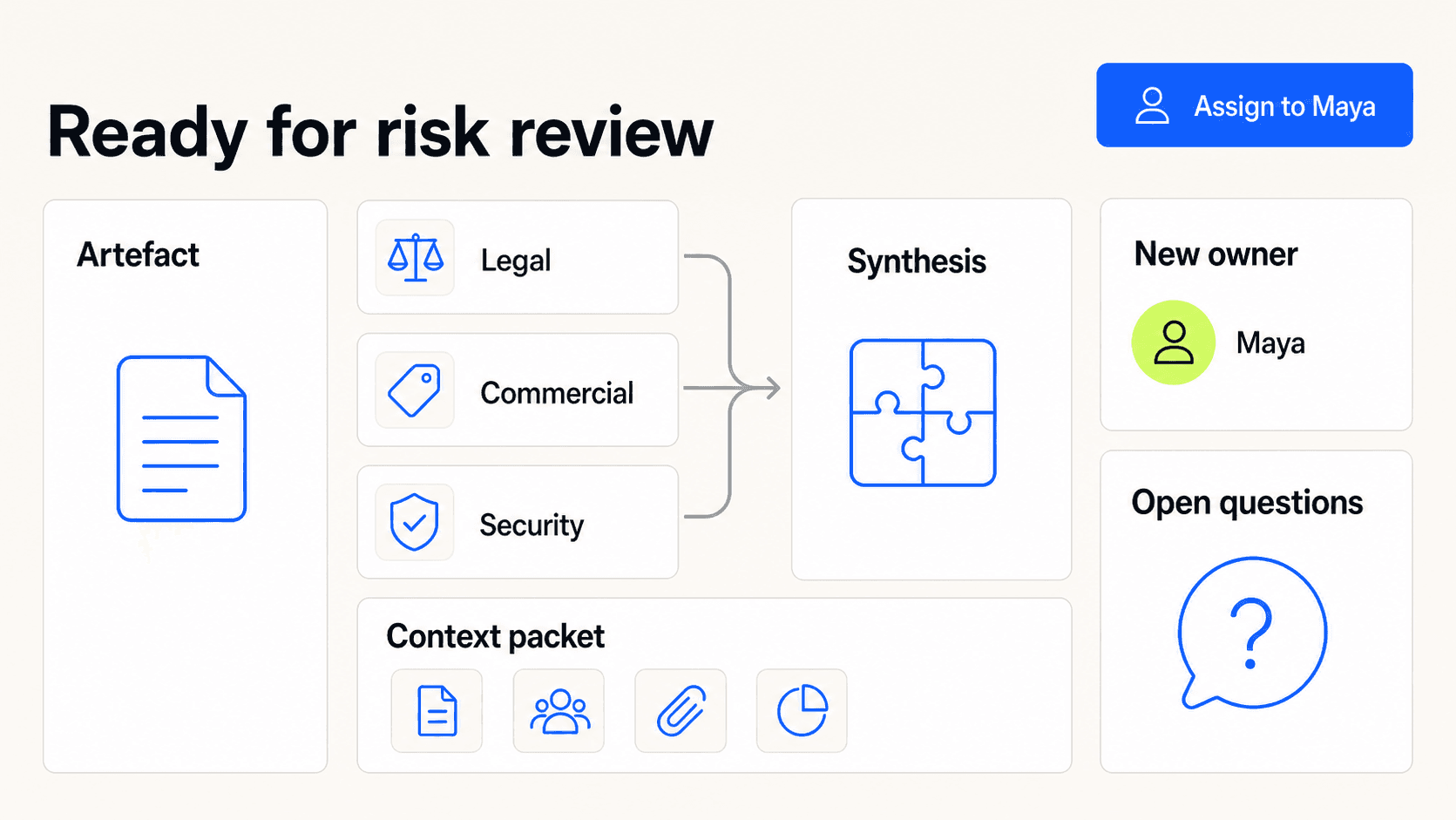
A handoff should reduce reconstruction, not transfer it to the next person.
Treat exceptions as a primary path
The happy path is where an agent looks impressive. Exceptions are where the product proves whether it is dependable.
An exception can be missing information, conflicting evidence, a policy constraint, an unavailable tool, a novel case, or an action outside the agreed scope. These are not all “errors”. Many require judgment.
Pattern 11 · Exception route
Give common exception classes a designed destination.
Missing access might route to an administrator. Policy conflict might route to a domain owner. Uncertain identity might return to the requester. A system fault might retry automatically before creating an incident.
The route should be part of workflow design, not a generic fallback message.
Pattern 12 · Escalation with evidence
Send the exception, attempted work, relevant evidence, and a clear question together.
“The agent needs help” is not an actionable escalation. “Two policies conflict; choose which policy governs this supplier” gives the reviewer a job.
Preserve what the system completed so the reviewer does not need to begin again.
Pattern 13 · Pause and resume
Let work wait safely without losing state.
Pausing should stop new actions, preserve completed artefacts, record the reason, and make the conditions for resuming visible. If external systems may continue processing, explain that honestly.
A paused workflow is a managed state, not a failed run.
Pattern 14 · Takeover with return
Allow a person to take control of the active step and later hand the workflow back.
The takeover view should show what has already happened, the current draft or tool state, and the consequences of continuing manually. When control returns to the agent, package the person’s changes as new context.
This avoids the common choice between accepting the agent’s path and abandoning automation entirely.
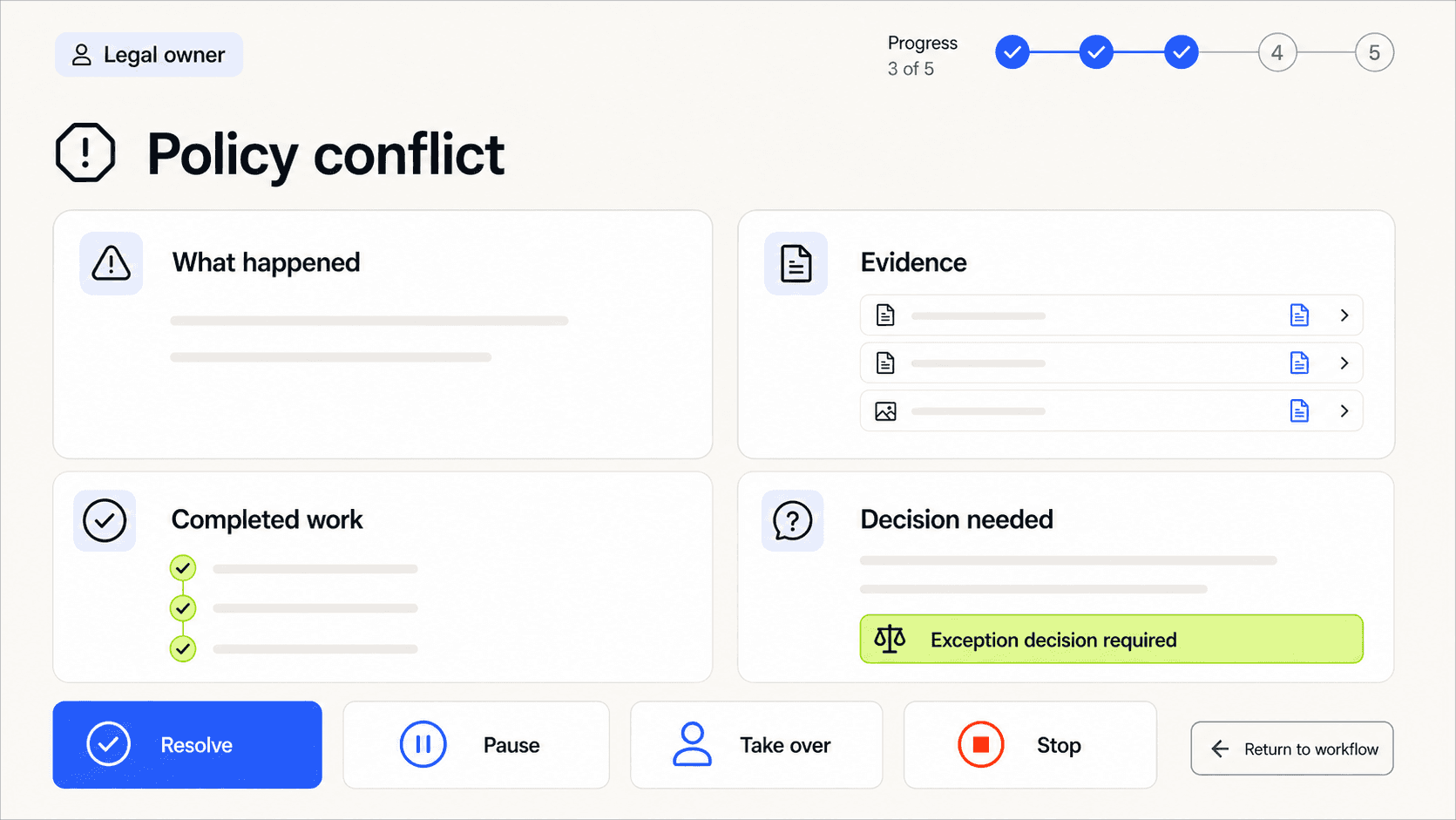
An exception interface should make the next useful decision easier than restarting the work.
Commitment and Operations
Protect the systems where work becomes real
Drafting a recommendation and sending it to 12,000 customers are not equivalent actions.
Agentic workflows often cross from flexible knowledge work into systems of record: payments, customer communication, permissions, inventory, contracts, code, or publishing. The interface should make that boundary visible.
Pattern 15 · Draft-to-commit boundary
Separate reversible preparation from consequential action.
An agent can prepare an email campaign, stage a database update, or assemble a purchase order without committing it. The transition to the real action should show scope, impact, policy checks, and the approval requirement.
Do not hide commitment behind an ambiguous Continue button.
Pattern 16 · Idempotent action design
Design retries so they do not duplicate real-world effects.
If a tool times out after sending a payment or message, the system may not know whether the action succeeded. The workflow needs a stable action identifier, a way to verify external state, and a safe retry path.
The user experience should distinguish “failed”, “status unknown”, and “confirmed complete”.
Pattern 17 · Recovery point
Create a known state to return to after trouble.
Recovery may mean restoring a saved draft, reversing a reversible update, reopening a checkpoint, or starting a compensating action. Show what recovery will and will not undo.
The promise of an Undo control must match the reality of connected systems.
Operate the workflow after launch
Shipping the agent is the beginning of workflow design, not the end.
New exception types appear. People discover better handoff points. A policy changes. One tool becomes unreliable. A seemingly efficient automation shifts hidden work to another team.
Pattern 18 · Learning loop
Turn operational signals into workflow improvements.
Capture where people edit plans, reject recommendations, take over, reopen completed work, or repeatedly solve the same exception. Connect those signals to the workflow version, tools, policy, and outcome.
Do not automatically learn from every correction. Some corrections are local preferences, some reflect temporary context, and some expose a policy problem. Route learning to an accountable owner who can decide what should change.
Microsoft’s guidance on core business-process transformation emphasises ownership across the full agent lifecycle: building, running, monitoring, and improving the process. That operational ownership is what turns a demo into a product. Microsoft Learn, Core business process transformation pattern
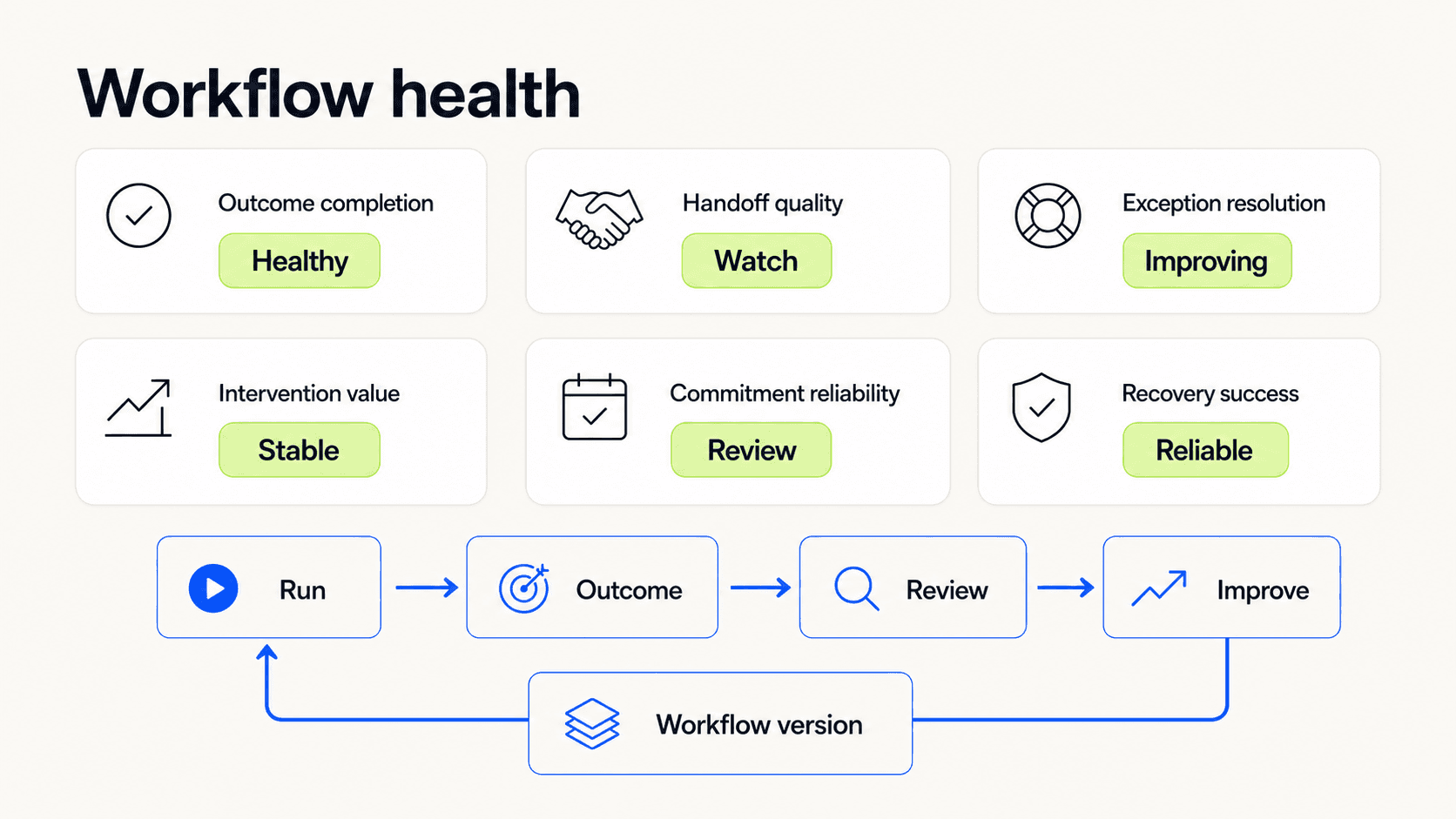
Operational signals should improve the workflow, not disappear into separate analytics.
Common AI workflow failure modes
Chat as the workflow
Every step happens in one conversation. State, ownership, approvals, and outputs become difficult to scan or reuse.
Use chat for flexible interaction, then give important work a structured home.
Invisible plan mutation
The agent changes scope or approach during execution without making the change visible.
Show meaningful plan changes, especially when they affect cost, timing, data, or impact.
Handoff by transcript
The next person receives the full history and is expected to find what matters.
Create a context packet with decisions, evidence, gaps, and a specific request.
Approval at every step
The product responds to uncertainty by asking permission constantly.
Group low-risk actions within an agreed boundary and reserve approval for changes in risk or commitment.
One generic error state
Missing access, policy conflict, uncertainty, tool failure, and user cancellation all look the same.
Different causes need different owners and recovery paths.
Automation without ownership
The agent runs across teams, but nobody owns the end-to-end result.
Assign one accountable workflow owner even when responsibility for individual steps is distributed.
Completion without outcome
The system reports that every tool call succeeded, but the user’s goal was not achieved.
Completion criteria should describe the result, not merely execution.
Learning from noise
Every edit changes the workflow or model behaviour.
Separate one-off corrections from durable product learning and review changes before broad application.
What to measure
Measure the quality of the work system, not only model output.
Outcome completion
Did the workflow achieve the user’s stated result and completion criteria?
Time to meaningful progress
How quickly did the workflow produce the first useful artefact, decision, or resolved stage?
Human reconstruction effort
How much time did people spend finding context, checking state, or rebuilding what happened?
Handoff quality
Could the next participant continue without reopening sources or asking for information already available?
Exception resolution
Which exceptions occur, where do they route, how long do they wait, and how often do they recur?
Intervention value
When people pause, edit, reject, or take over, does the intervention improve the eventual outcome?
Commitment reliability
How often do real-world actions duplicate, partially complete, enter an unknown state, or require manual repair?
Recovery success
Can interrupted work resume from a known point without losing valid progress?
Workflow drift
Does the actual route through the work still match the intended operating model and risk boundaries?
NIST’s AI Risk Management Framework recommends quantitative, qualitative, or mixed methods that are connected to the deployment context, documented, and updated as risks and impacts change. It also calls for deployed AI systems to be monitored in production. NIST, AI RMF Core: Measure
A Practical Workflow Review
Use these questions in discovery, service mapping, design critique, and launch review.
Outcome
What does successful completion mean to the user?
Which evidence proves the outcome was achieved?
Are system completion and user success being confused?
Work model
Which steps need consistency and which need judgment?
Where does state live between interactions?
Can the user see the current owner and next event?
Boundaries
Which data, tools, records, and actions are in scope?
Where does reversible preparation become commitment?
Which changes require a new agreement with the user?
Handoffs
What artefact moves with the work?
Does the next participant receive decisions, evidence, gaps, and a clear request?
Is ownership transferred explicitly?
Exceptions
What are the expected exception classes?
Who owns each route?
Can work pause, resume, and preserve valid progress?
Recovery
What does Stop actually stop?
What external actions cannot be undone?
Is there a safe state from which to continue?
Operations
Who owns workflow performance after launch?
Which interventions and outcomes feed the learning loop?
How are workflow, tool, and policy versions connected to results?
The Interface Is the Work System
The easiest way to add AI to a product is to place a prompt beside the existing work.
Sometimes that is enough. A local assistant can remove real friction without changing the wider service.
But when the system begins to coordinate steps, use tools, modify records, wait for people, and recover from exceptions, the design problem changes.
The interface is no longer a thin layer over the workflow. It is where the workflow becomes understandable.
People need to see the goal, the boundary, the state, the owner, the evidence, the commitment, and the recovery path. Agents need stable inputs, clear tools, designed exception routes, and feedback tied to real outcomes.
The best AI-native workflows do not make people supervise every move. They make the important moves legible.
That is the balance worth designing for: less coordination work, without losing the context and control that keep work dependable.

