
The interface failed before the agent did
When an AI agent sends the wrong email, deletes the wrong file, or books the wrong trip, the visible mistake is usually the end of a longer design failure.
The interface accepted a vague goal. It hid an assumption. It asked for more access than the task needed. It showed activity without showing direction. Then it presented an approval button with too little context to make approval meaningful.
By the time the agent acted, the product had already removed most of the useful opportunities to correct it.
We have spent decades designing interfaces around direct manipulation. A person selects an object, chooses an action, and sees a result. Agentic products change that relationship. The person describes an outcome, while the system may decide which steps to take, which tools to call, which information to use, and when the work is complete.
That is a different design problem.
An agent is not simply a chatbot with a longer loading state. Anthropic describes an agent as a model that directs its own process and tool use, moving through a loop of planning, acting, observing, and adjusting until the task is done or human input is needed. The practical change is delegation. The user is no longer controlling every action directly. They are giving some decision authority to software. Anthropic, Trustworthy agents in practice
Agentic UX is the interaction layer that makes that delegation understandable and governable. It helps people express intent, set boundaries, inspect plans, follow progress, intervene, approve important actions, and repair mistakes.
The most useful agent is not the one that acts with the least human involvement. It is the one that takes the right amount of initiative for the situation, while keeping the person meaningfully in control.
What agentic UX actually covers
The phrase “agentic design pattern” is used for two different things.
Engineering teams use it for system patterns such as routing, tool use, prompt chaining, evaluator loops, and multi-agent orchestration. Those patterns describe how the system works internally.
Agentic UX patterns describe how people understand and govern that work. They include task briefs, permission boundaries, plan previews, progress timelines, approval cards, action receipts, memory controls, and rollback.
Both layers matter, but they solve different problems. A well-built agent can still create a poor experience if the person using it cannot answer a few basic questions:
What did the agent understand?
What is it allowed to do?
What is it doing now?
Why has it stopped?
What changed?
Can I reverse it?
This guide focuses on the user-facing layer. It covers the practical patterns a product team needs across the full agent lifecycle, from the first explanation of capability to long-term memory and multi-agent work.
It is deliberately broader than a list of approval dialogs. Approval is one control. Good agentic UX is a connected system of intent, boundaries, visibility, judgment, recovery, and learning.
The delegation loop
I find it useful to design agentic work as an eight-part loop:
Frame the relationship.
Bound the task.
Plan the work.
Act with visibility.
Inspect the result.
Commit consequential changes.
Recover when needed.
Learn with permission.
The loop matters because agent interaction rarely ends with one response. A task can move backwards. New information may change the plan. A failed action may require a smaller scope. A user may take over, fix one step, and return control to the agent.
The interface needs to support that movement without making people restart from a blank prompt.

The delegation loop is a better design model than a chat transcript.
Intent, Scope and Autonomy
How to read the pattern library
No product needs every pattern at full strength. A writing assistant and a payment agent should not create the same amount of friction.
The value of a pattern library is not that it gives every team the same answer. It gives teams a shared language for deciding where control, explanation, and recovery belong.
This library contains 55 patterns organised into ten categories. The two number systems do different jobs: category numbers group related design problems, while pattern numbers run continuously from 01 to 55.

Category numbers organise the library. Pattern numbers identify individual patterns across the whole article.
Category 01 · Frame the relationship
Before asking for a task, help the user understand what kind of system they are dealing with. This category establishes the agent’s identity, working range, and role in relation to the person using it.
These patterns matter most at the first point of contact. A clear introduction reduces trial and error later because people can form a realistic idea of what the agent can do before they delegate real work.
Pattern 01 · Agent identity and attribution
Make it clear that an AI system is acting, which product or organisation provides it, and whose authority it is using. The user should not have to infer whether an action came from them, a teammate, an automated rule, or an agent.
Attribution becomes more important when work appears in another person’s inbox, calendar, document, or account. Downstream recipients may need the same clarity as the person who initiated the task.
Pattern 02 · Capability contract
Explain what the agent can do, what it cannot do, and which actions still need human judgment. Keep this close to the first-run experience and make it easy to revisit later.
Microsoft’s agent design guidance recommends setting expectations about purpose, variable output quality, and the need for review during first use. That is more useful than a generic warning that “AI can make mistakes.” Microsoft, Human-centered design for agents
Pattern 03 · Guided task starters
Show realistic starting points based on outcomes rather than clever prompts. “Prepare the weekly project update” is more useful than “Ask me anything.”
Good starters reveal the agent’s working range. They also reduce the false impression that the user must discover a hidden command language through trial and error.
Pattern 04 · Safe sandbox
Let people test the agent with sample data, preview-only actions, or an isolated workspace before granting access to real systems. Google PAIR recommends low-commitment exploration so users can form a better mental model before sharing more data or accepting more risk. Google PAIR, People + AI patterns
This is especially valuable when the product is unfamiliar or the outcome is difficult to reverse.
Pattern 05 · Channel-fit entry point
Do not force every agent into a blank chat window. Start from the place where the intent already exists: a selected email, a document, a ticket, a calendar event, a dashboard alert, or a structured form.
Chat is useful for ambiguity. Forms, tables, canvases, and inline actions are often better for precise scope and review.
Category 02 · Capture intent and context
Agents need more than a sentence. They need a usable brief that makes the goal, context, constraints, and finish line visible.
This category turns a loose request into a shared task contract. Use these patterns when a wrong assumption could change the audience, source material, cost, permissions, or expected output.
Pattern 06 · Structured intent capture
Combine natural language with fields for the details that cannot safely remain implicit. Audience, deadline, account, tone, destination, budget, and approval owner are common examples.
The structure should follow the task. A travel agent may need dates and a spending limit. A research agent may need source requirements and a freshness cut-off.
Pattern 07 · Task scope card
Translate the request into a compact, editable statement of work. Show the goal, included items, excluded items, constraints, and expected output in one place.
This gives both sides a shared object to refer to. The user can correct the task without rewriting the conversation, and the system can show when new information has changed the scope.
Pattern 08 · Clarification checkpoint
Ask when a missing answer would materially change the result, permission, cost, or affected people. Do not interrupt for details the agent can safely discover or choose within existing preferences.
The hard part is not asking questions. It is knowing which uncertainty belongs to the agent and which belongs to the user. Anthropic describes this as a central tension: an agent that pauses at every gap loses its usefulness, while one that always pushes ahead risks misreading intent. Anthropic, Trustworthy agents in practice
Pattern 09 · Assumption register
List the assumptions that are shaping the plan, especially when the agent had to infer them. Keep each assumption editable and show which steps depend on it.
This is better than hiding important guesses inside a fluent response. It also helps a user correct one premise without throwing away the whole task.
Pattern 10 · Context and source picker
Show which files, conversations, databases, accounts, and websites the agent will use. Let the user add, remove, or prioritise sources.
Source selection is both a relevance control and a privacy control. The fact that the agent can access something does not mean it should use it for every task.
Pattern 11 · Definition of done
Let the user describe what a successful finish looks like. This might include a format, quality bar, required evidence, delivery location, or a condition that must be true.
Without a visible stopping rule, agents can overwork, stop too early, or optimise for a proxy that the user never intended.
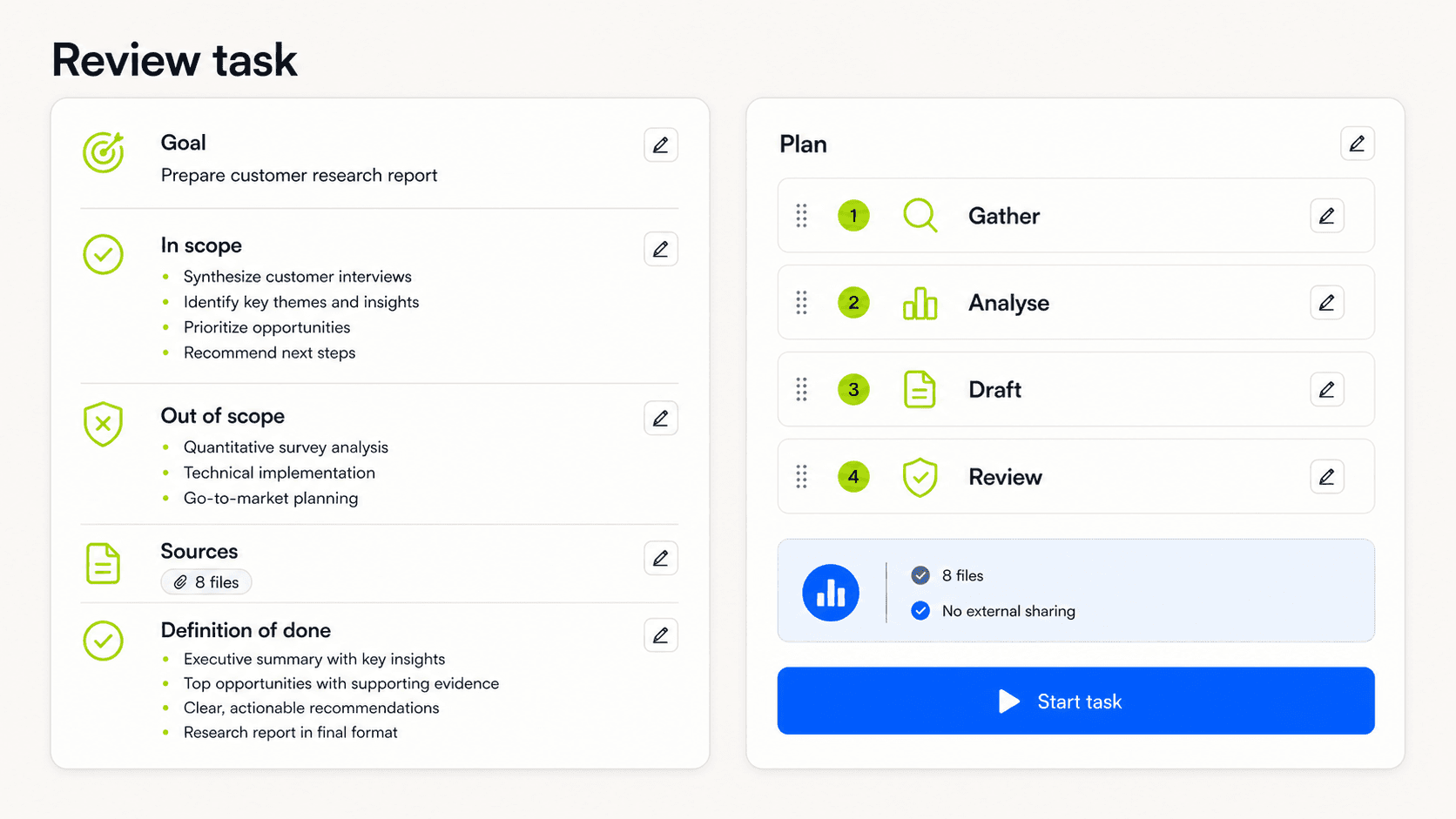
A strong start makes the task contract inspectable before execution.
Category 03 · Set autonomy and boundaries
Autonomy should be a visible agreement, not a personality trait assigned to the agent. The user needs to know what the system may do, where it may act, and which decisions still belong to a person.
These patterns translate authority into concrete limits. They are especially important when the agent can spend money, contact people, edit shared records, retain information, or keep working after the user leaves.
Pattern 12 · Autonomy ladder
Offer a small set of understandable modes, such as:
Suggest only.
Draft for review.
Act after approval.
Act within agreed limits.
The language should describe what changes in practice. Labels such as “balanced” or “smart” sound friendly but hide the actual authority being granted.
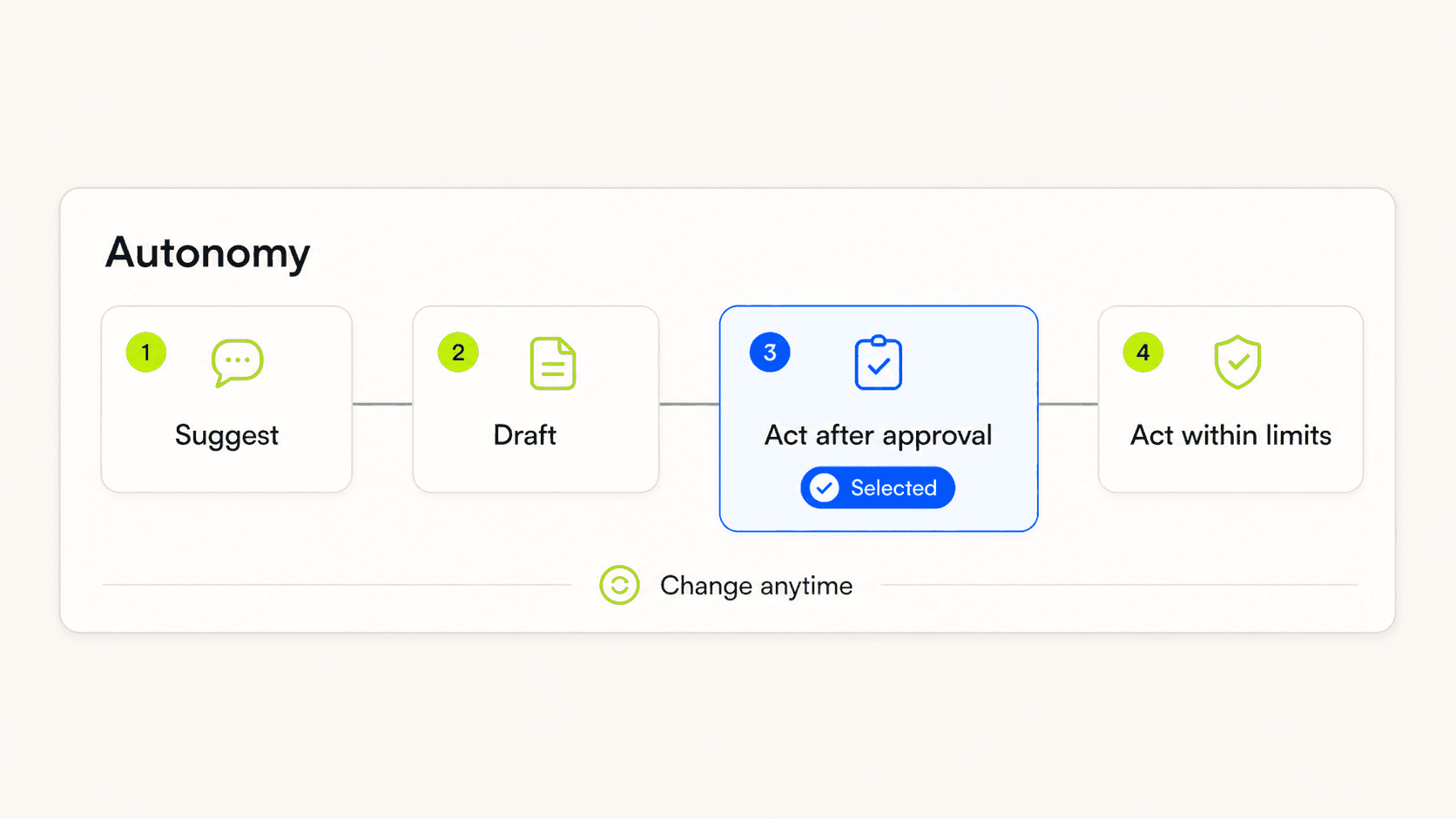
Autonomy should be a setting, not a surprise.
Pattern 13 · Just-in-time permission
Ask for access when the task reaches the point that needs it. Explain the immediate benefit and the exact resource involved.
A request to “connect your workspace” is too broad. “Read these three project folders to prepare the report” gives the person something concrete to judge.
Pattern 14 · Least-privilege boundary
Scope access by action, data, account, duration, and destination. A research agent that needs to read a folder should not receive permission to edit or delete it.
Security controls must exist below the interface, but the interface still needs to make the boundary legible. Microsoft recommends limiting agents to the minimum tools, data, and operations required. Microsoft, Reduce autonomous agentic AI risk
Pattern 15 · Memory consent
Separate permission to use information for the current task from permission to save it for future tasks. These are different decisions.
Do not hide durable memory inside a general terms screen. If a preference is worth remembering, show what will be stored, why it may help, and how to remove it.
Pattern 16 · Risk-based approval rules
Let low-risk, reversible actions proceed with light oversight. Pause before actions that are external, costly, difficult to detect, hard to reverse, or likely to affect another person.
OpenAI’s agent guide recommends human intervention for high-risk actions and when the agent exceeds failure thresholds. OpenAI, A practical guide to building agents
The approval rule should be visible before the run starts. Surprise approvals feel like failure. Expected checkpoints feel like part of the plan.
Pattern 17 · Time, cost, and action budget
Give users control over how long the agent may run, how much it may spend, how many records it may change, and how many retries it may attempt.
Show both the limit and current use. A budget hidden in settings does not help someone decide whether a live task is behaving reasonably.
Execution and Control
Category 04 · Make the plan inspectable
A plan is useful when it helps the user predict behaviour and shape the work. It is not useful when it is a decorative list produced after the important decisions are already fixed.
This category makes the proposed route visible before action begins. Use it when order, scale, dependencies, or downstream effects could change whether the user wants the agent to proceed.
Pattern 18 · Plan preview
Show the proposed steps before execution when sequence, scope, or impact matters. Keep it concise enough to scan.
The plan should describe observable actions, not private model reasoning. Raw chain-of-thought is not a reliable or suitable explanation layer. OpenAI has explained that it does not show raw reasoning traces to users, while useful ideas can be represented in summaries and answers. OpenAI, Learning to reason with LLMs
Pattern 19 · Editable plan
Allow the user to remove, reorder, replace, or pin steps. Editing should update the downstream effect on time, permissions, and output.
This turns review into participation. A 2026 Microsoft Research study of a spreadsheet agent found that active involvement during execution helped users catch errors that post-hoc review missed and increased their sense of co-ownership. The study was small, with a formative sample of 8 and an evaluation sample of 16, so it is a useful design signal rather than a universal rule. Microsoft Research, Auditing and Controlling AI Agent Actions in Spreadsheets
Pattern 20 · Impact preview
Summarise what the plan will read, create, change, send, publish, spend, or delete. Include the scale of the action and who or what will be affected.
“Update CRM” is not an impact preview. “Change the renewal stage for 38 accounts and notify four account owners” is.
Pattern 21 · Dry run
Simulate the workflow without committing changes. Use real validation where possible, but keep writes isolated or staged.
A dry run is useful for new automations, large batches, unfamiliar tools, and tasks where errors become expensive only after several steps.
Pattern 22 · Delegation map
When several agents or services will contribute, show who owns each part and where handoffs occur. The user should not have to understand the architecture, but they do need to understand responsibility.
This becomes important when one agent can ask another to act with different permissions or data access.
Category 05 · Keep execution visible and interruptible
Once the run begins, the interface should answer three questions without requiring a new prompt: Is it working? Is it still following my intent? Can I stop it?
These patterns make live work understandable without exposing every low-level event. They matter most for long-running, multi-step, background, or expensive tasks where waiting passively would leave the user unable to spot drift.
Pattern 23 · Live status
Use clear states such as queued, planning, running, waiting for approval, blocked, paused, completed, and failed. Avoid vague animations that make every state look like “thinking.”
State language should describe the system, not pretend it is a person. “Checking availability” is clearer than “I’m having a little think.”
Pattern 24 · Progress timeline
Show completed, active, upcoming, skipped, and changed steps. If the plan changes, preserve the earlier version or explain the revision.
Progress is not always a percentage. For open-ended work, milestone-based progress is more honest than a number the system cannot support.
Pattern 25 · Action and tool trace
Record the meaningful actions the agent takes, including the tool, target, result, and timestamp. Collapse low-level noise by default and allow deeper inspection when needed.
This is an activity record, not a stream of hidden reasoning. Users need evidence of what happened, not a performance of thought.
Pattern 26 · Background run
Let long tasks continue without trapping the user on one screen. Provide a task centre, reliable return state, and notifications for completion, questions, or risk changes.
The agent should resume with the full context intact. “Something finished” is a poor notification. Say what finished and whether the user needs to act.
Pattern 27 · Pause, stop, and take over
These controls should remain visible during execution. Explain what each one does to in-flight work and whether completed actions remain in place.
Pause preserves the run. Stop ends it. Take over moves the user into the working surface with enough context to continue manually. Those are different outcomes and should not share one ambiguous button.
Pattern 28 · Help request and blocked state
When the agent cannot proceed, show what it tried, what is missing, and the smallest decision needed from the user. Preserve completed work and continue from the interruption point.
Do not turn every tool error into “Please try again.” The interface should distinguish missing access, unavailable data, a conflicting rule, and an uncertain preference.
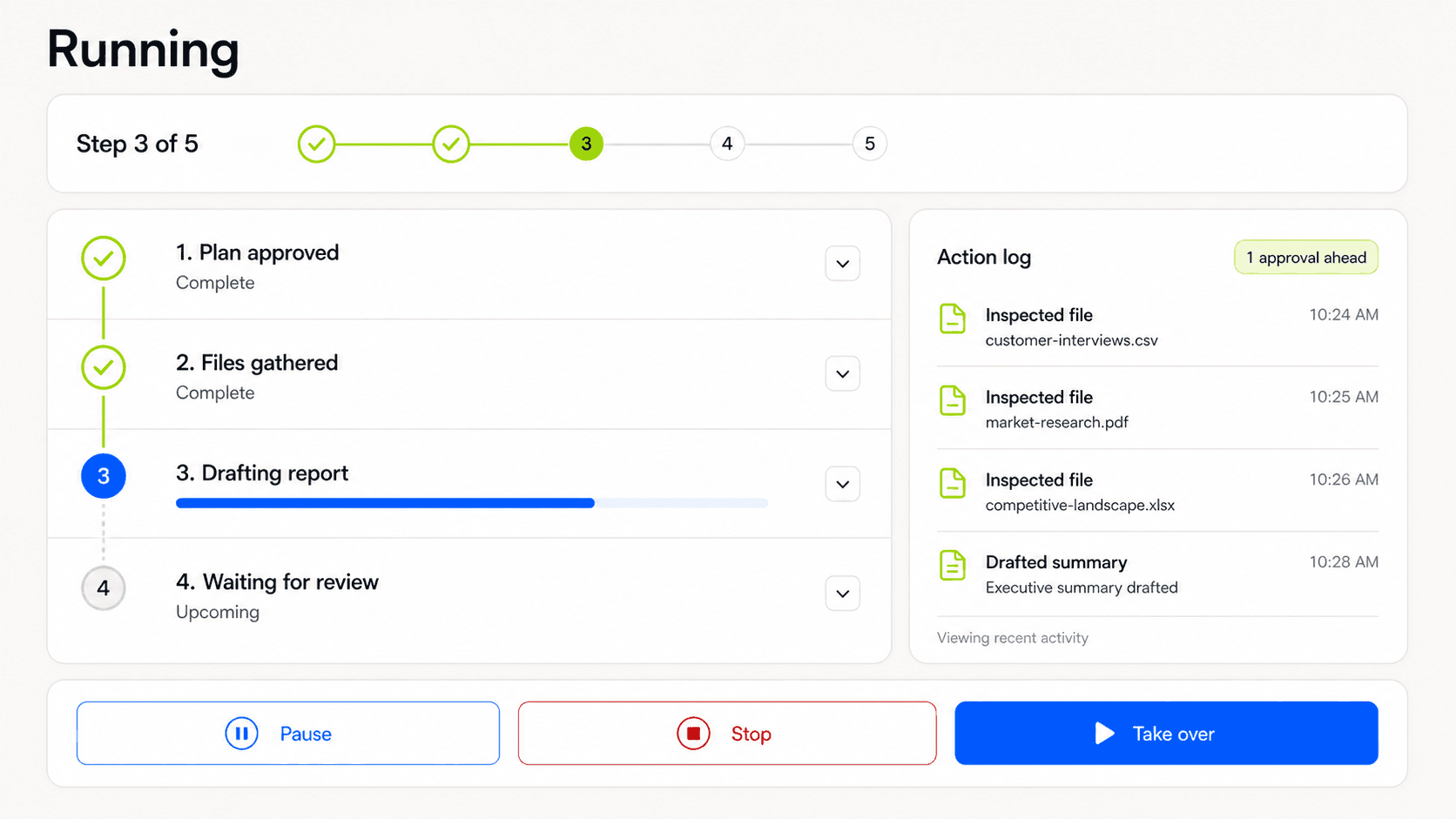
Progress should explain what is happening and preserve human control.
Review, Recovery and Trust
Category 06 · Design review and commitment
Review is where many products add friction without adding judgment. A useful checkpoint gives the reviewer enough context to notice a problem and a realistic way to change the outcome.
This category separates preparation from commitment. Use these patterns when an action will become external, shared, costly, public, or difficult to reverse, and the reviewer needs more than a generic confirmation button.
Pattern 29 · Draft-to-commit boundary
Keep preparation separate from consequential action. The agent can draft an email, stage a database update, or assemble a purchase before it sends, writes, or pays.
This two-phase structure creates a clean point for validation and makes the system easier to test.
Pattern 30 · Approval card
An approval surface should answer:
What will happen?
Why is approval needed now?
What evidence supports the action?
What are the important consequences?
What can the reviewer change?
Is the action reversible?
An “Approve” button under a paragraph of confident prose is not meaningful oversight.
Pattern 31 · Diff and output preview
Show the proposed change against the current state. Highlight additions, removals, moved items, recipients, totals, and side effects.
Use the representation native to the work. Code needs a diff. A calendar change needs a before-and-after schedule. A batch update needs changed rows and exception counts.
Pattern 32 · Evidence and source grounding
Place the relevant source next to the claim or decision it supports. Let users open the source and see which part was used.
Evidence is more valuable than a decorative confidence score. It supports independent judgment and makes correction easier.
Pattern 33 · Uncertainty and alternatives
Express uncertainty in terms the user can act on. Explain what is uncertain, why it matters, and what options exist.
Google PAIR warns that numeric confidence can be difficult to interpret without context. A phrase such as “Two invoices have conflicting totals, so I left them unsubmitted” is often more useful than “82% confident.” Google PAIR, People + AI patterns
Pattern 34 · Exception-first batch review
For large sets, focus human attention on anomalies, policy conflicts, low-evidence decisions, high-impact items, and changes outside normal ranges. Let safe, repetitive items remain grouped.
This reduces approval fatigue. Human attention is finite, and asking someone to inspect 500 equivalent rows usually creates a ritual rather than oversight.

Approval is useful when it exposes consequences, not just a confirmation button.
Category 07 · Make completion accountable
“Done” should describe a verified state, not the agent’s confidence that it probably finished. Completion needs evidence, attribution, and an honest account of anything that did not happen.
These patterns turn a finished run into something another person can inspect and continue. They are useful whenever outputs move into shared systems, regulated workflows, or handoffs between people and teams.
Pattern 35 · Completion receipt
Summarise what changed, where it changed, what failed, what was skipped, and what remains for the user. Include links to the resulting artefacts.
The receipt should match the original definition of done. If the task was to send 20 invitations and two failed, the status is partial completion, not success.
Pattern 36 · Audit trail
Keep a durable history of task scope, plan changes, approvals, actions, tool results, and recovery. Make it searchable and exportable when the work carries legal, financial, or operational weight.
The interface can simplify this history for everyday use while preserving a deeper record for investigation.
Pattern 37 · Action attribution and disclosure
Mark which content and actions were produced by the agent, approved by a person, edited by a person, or generated by another system. Preserve that provenance when the output moves downstream.
This matters for accountability and for the next person deciding how much to trust the work.
Pattern 38 · Handoff package
When work moves to another person, provide the goal, current status, key evidence, unresolved questions, decisions already made, and the next expected action.
Human handoff should not be a transcript dump. It should be a compact transfer of working context.
Category 08 · Design recovery before failure
Recovery is part of the main flow. Agents will encounter changing data, unavailable tools, ambiguous instructions, and mistaken assumptions.
This category protects useful work when reality breaks the plan. Design these patterns before launch, especially for tasks that cross several tools or contain steps that can succeed and fail independently.
Pattern 39 · Actionable error state
Say what failed, what the agent changed before the failure, and what can happen next. Separate a safe stop from partial damage.
Avoid blame-shifting language. “The API returned an error” may be technically correct, but the user still needs to know whether anything was sent, charged, or saved.
Pattern 40 · Retry with change
Let the user adjust the failed step, source, tool, permission, or constraint before retrying. Repeating the same action with the same inputs is rarely a recovery strategy.
Show what will be different this time.
Pattern 41 · Undo and rollback
Offer reversal at the same level as the original action. A batch change needs batch rollback. A multi-step task may need a restore point rather than 17 separate undo clicks.
Google PAIR recommends giving control back to the user when automation fails and making the manual path forward clear. Google PAIR, People + AI patterns
Pattern 42 · Partial completion and resume
Preserve successful work, label incomplete parts, and allow the task to continue from a known checkpoint. Make dependencies visible so users do not resume from a corrupted state.
This matters for long-running tasks and any workflow that crosses several tools.
Pattern 43 · Human escalation
Route sensitive, ambiguous, or repeatedly failing cases to a person with the relevant context attached. Make ownership and expected response time visible.
Escalation should feel like a designed path, not the agent quietly giving up.
Pattern 44 · Incident and problem report
Provide a way to report harmful, suspicious, or policy-breaking behaviour. Include the task record automatically, while allowing the user to review what will be shared.
For security-sensitive agents, the report path should connect to containment and review, not only product feedback.
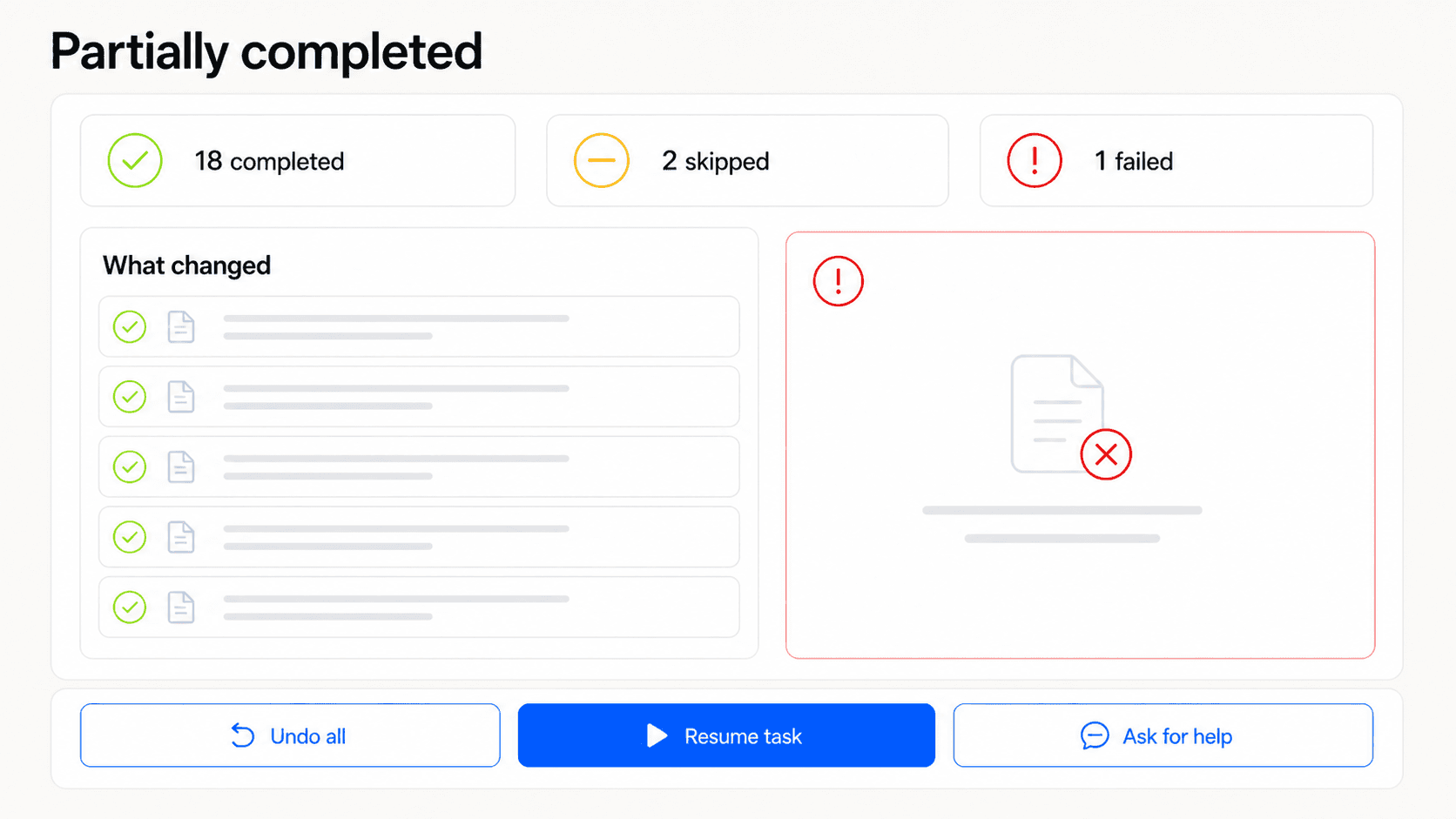
Failure states should preserve work and show a credible path forward.
Memory and Multi-Agent Systems
Category 09 · Let the system learn with permission
Adaptation can reduce repeated work. It can also make behaviour harder to predict if the product learns silently.
Use these patterns when feedback, preferences, or task history may affect future behaviour, particularly when several people or agents share the same workspace. The user should know what the product will remember and how to change it.
Pattern 45 · Feedback as teaching
Let users correct the output, explain a preference, reject an action, or flag a bad source. Acknowledge the feedback and explain whether it affects only this result, future tasks, or the wider system.
Google PAIR recommends telling users how feedback will change their experience, not merely thanking them for it. Google PAIR, People + AI patterns
Pattern 46 · Memory preview before save
When the agent identifies something worth remembering, show the proposed memory in plain language before saving it. Let the user edit its wording and scope.
“Remember that I prefer concise weekly updates” is inspectable. A hidden vector representation is not a user control.
Pattern 47 · Memory centre
Give people one place to view, edit, delete, expire, and export saved information. Show when each memory was created, where it came from, and which agents can use it.
Microsoft’s guidance for agent memory recommends user-facing view, edit, and delete controls, alongside provenance and isolation. Microsoft, Manage AI memory safety in agentic systems
Pattern 48 · Preference or one-off
Ask whether a correction is a durable preference or specific to the current task. Do not turn every edit into a permanent rule.
People make exceptions. The interface needs a way to say “use this today” without teaching “always do this.”
Pattern 49 · Progressive autonomy
Allow users to grant more freedom after successful experience, but never infer expanded authority from repeated approvals alone. Show the proposed change and keep a simple way to step back.
Trust can grow. Permission should still be explicit.
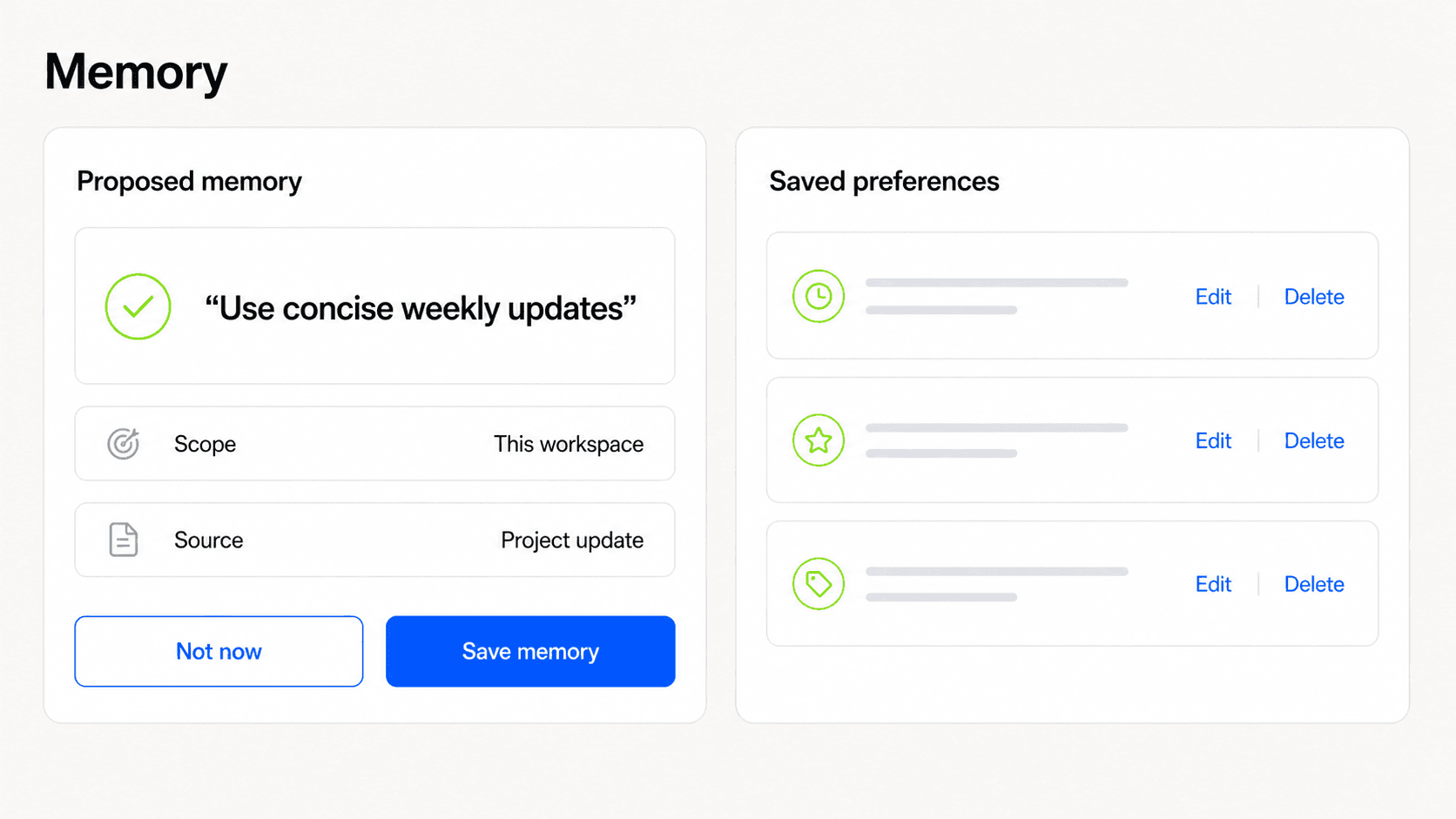
Memory needs consent at capture and control after capture.
Category 10 · Support multi-agent and ambient work
As products add specialist agents and background automation, coordination becomes part of the user experience.
Use these patterns when several agents can act with different tools or permissions, or when work continues without one person watching every step. Roles, handoffs, shared state, and interruptions should remain visible.
Pattern 50 · Agent roster and roles
List the active agents, their responsibilities, data access, tools, owner, and current status. Avoid a cast of human-like characters when role labels are clearer.
“Research”, “Policy check”, and “Publisher” communicate more than three avatars with invented personalities.
Pattern 51 · Orchestrator view
Give the user one primary place to set the goal and see the overall state, even if several agents do the work. The orchestrator should summarise dependencies, decisions, and exceptions without hiding the underlying actors.
Pattern 52 · Visible handoff
Show when work moves from one agent to another, what context is passed, and whether permissions change. A handoff is a control point when the next agent can do more than the previous one.
Pattern 53 · Conflict and adjudication
When agents disagree, surface the competing recommendations, evidence, and consequence of each option. Route the decision to the right person or policy rather than letting the loudest output win.
Pattern 54 · Shared state and provenance
Show the common task state and which agent added or changed each important part. Prevent stale agents from acting on an earlier version without warning.
This is especially important when tasks run asynchronously or one agent can revise another agent’s output.
Pattern 55 · Notification policy and quiet hours
Let users decide which events deserve interruption, which can wait for a digest, and when background agents should remain quiet. Group related events into one update.
Proactive assistance becomes noise quickly when every small action demands attention.
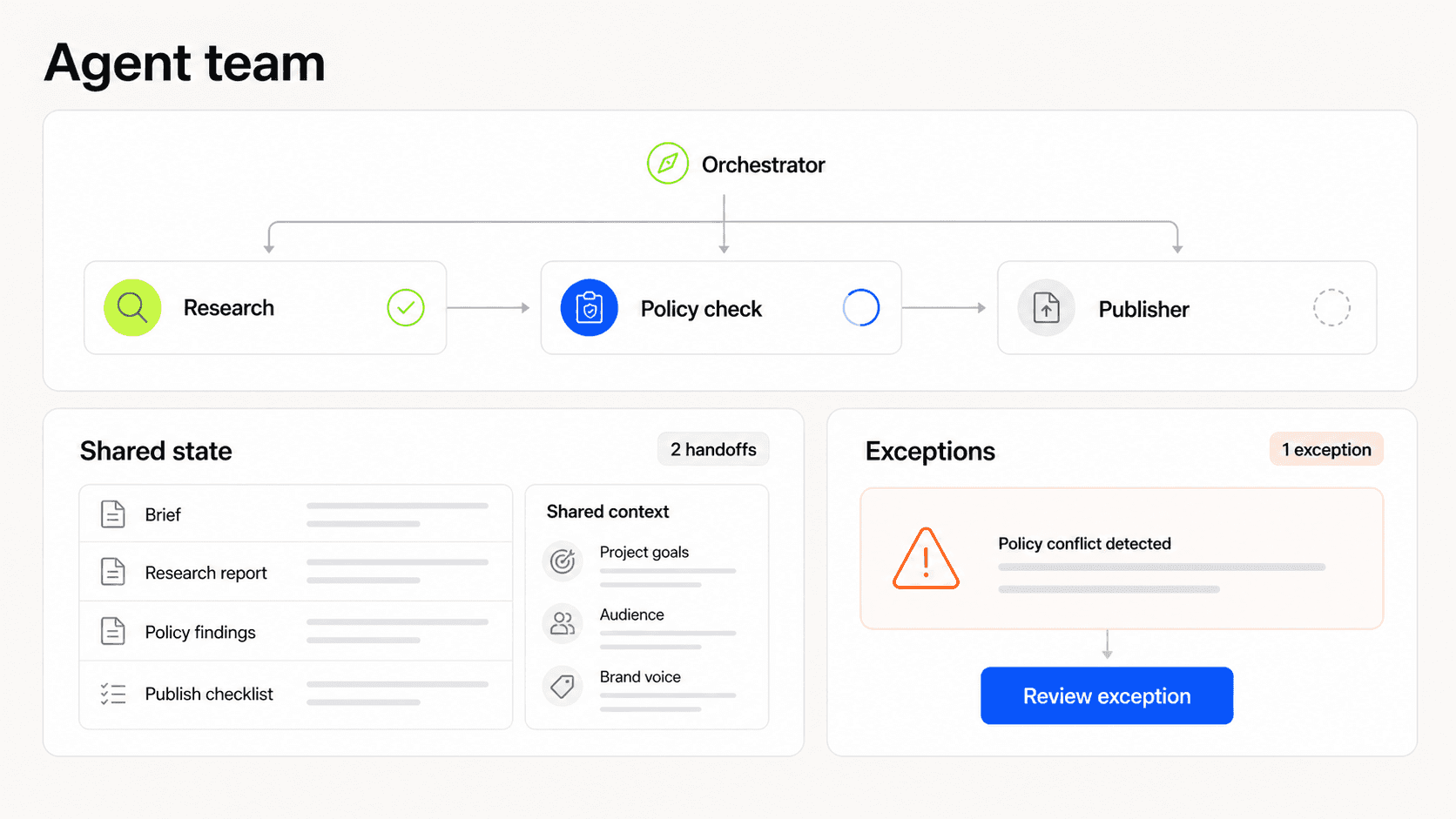
Multi-agent UX needs visible ownership, handoffs, and exception routing.
Putting the Patterns to Work
How to choose the right patterns
A comprehensive pattern library can create its own problem. Teams may add every control they can name and turn delegation into a form-filling exercise.
The better approach is to match control to risk.
I use four questions:
What is the impact if this goes wrong?
How easy is the action to reverse?
How easy is an error to detect?
How far does the action reach?
Reach includes the number of records, systems, people, accounts, and future tasks affected.
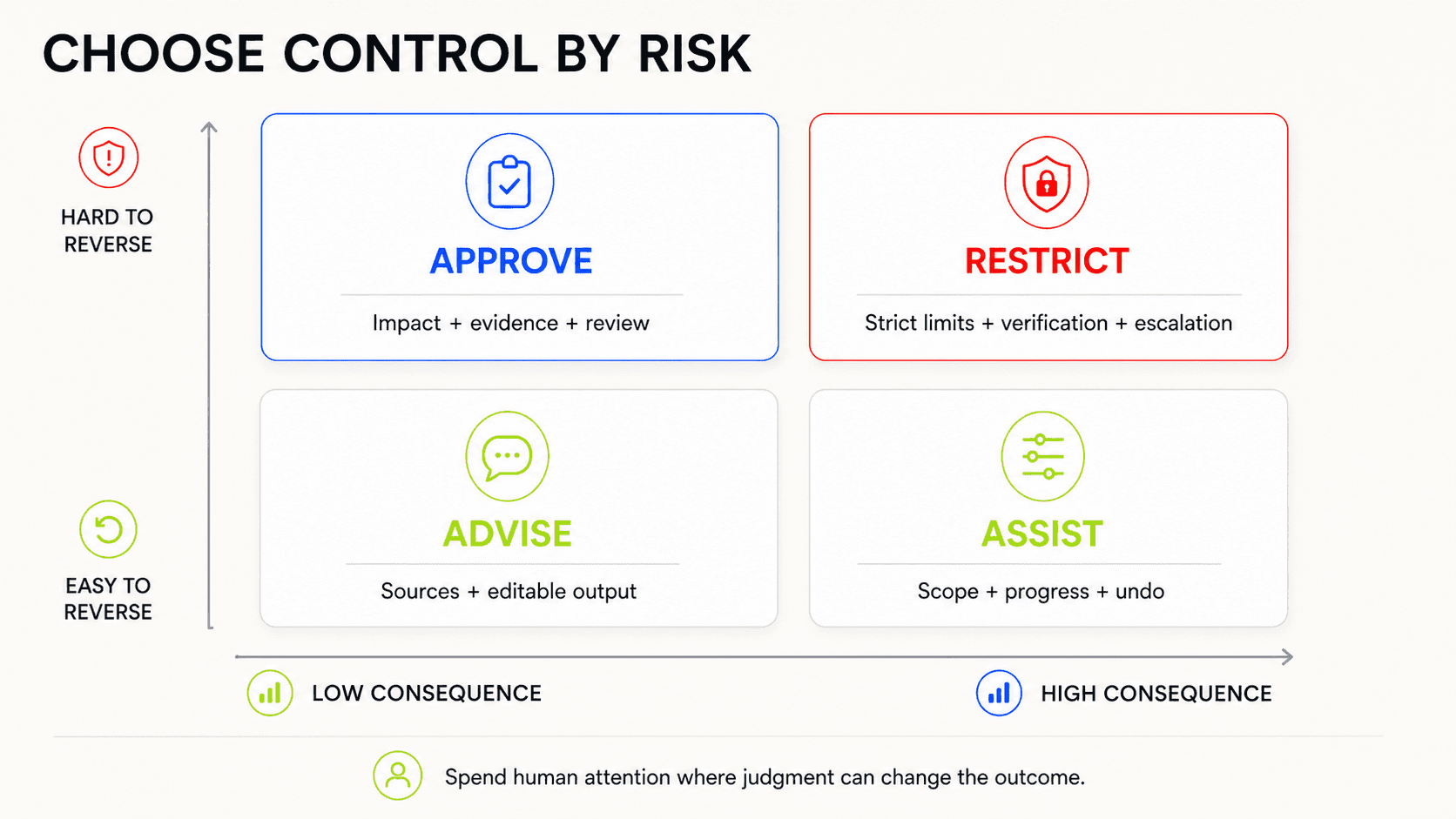
The right amount of control depends on consequence and reversibility, not how impressive the agent appears.
Tier 1: Advice with no external action
Examples include brainstorming, summarising a document, or suggesting options.
Use a capability contract, visible sources, editable output, uncertainty where it matters, and simple correction. A plan preview or approval step may add little value.
Tier 2: Reversible work in a bounded space
Examples include organising files in a temporary folder, drafting content, or updating a private working document with version history.
Add a task scope card, progress visibility, a completion receipt, and undo. Approval can be reserved for exceptions.
Tier 3: Consequential external action
Examples include sending messages, changing customer records, publishing content, booking travel, or modifying shared artefacts.
Add an impact preview, staged execution, evidence, a meaningful approval card, diff, attribution, and rollback where possible.
Tier 4: High-stakes or difficult-to-reverse action
Examples include payments, access changes, legal submissions, medical decisions, account deletion, or actions that affect employment.
Keep final authority with an accountable person. Use strict permission boundaries, explicit checkpoints, independent verification, audit history, and human escalation. Some tasks should remain human-led even if the agent can prepare the work.
Singapore’s 2026 Model AI Governance Framework for Agentic AI uses a similar risk-based logic. It calls for bounding agent powers, defining meaningful human checkpoints, applying technical controls through the lifecycle, and supporting responsible use through transparency and education. IMDA, Model AI Governance Framework for Agentic AI
The point is not to make high-risk flows slow. It is to spend human attention where judgment can change the outcome.
What this looks like in one product flow
Consider a fictional procurement agent asked to renew a set of software subscriptions.
The user starts from the finance workspace rather than a blank chat. A task scope card captures the departments, renewal window, total budget, and vendors that must not be changed.
The agent proposes a plan:
Collect current contracts and usage.
Flag duplicate or unused seats.
Prepare renewal options.
Route exceptions to department owners.
Stage approved purchases.
The impact preview says the agent will read 14 contracts, contact six owners, and prepare up to £42,000 in renewals. It cannot send purchase orders or change payment details.
During the run, the user sees a progress timeline and action trace. Most subscriptions move through automatically. Three appear in an exception queue because usage is unclear and one vendor changed its bank information.
The approval card for the safe renewals shows the total, the contracts involved, and the difference from last year. The bank-detail change is blocked and escalated to finance security. That is not a failure of autonomy. It is the system recognising where autonomy should stop.
The task ends with a receipt: eight renewals staged, two cancelled after owner confirmation, three awaiting review, one escalated, and £9,400 in avoided spend. Each outcome links back to its evidence and approval.
The agent then asks whether the user wants to remember one preference: “Always flag renewals with less than 60% seat usage.” The user can save it for this workspace, edit the threshold, or dismiss it.
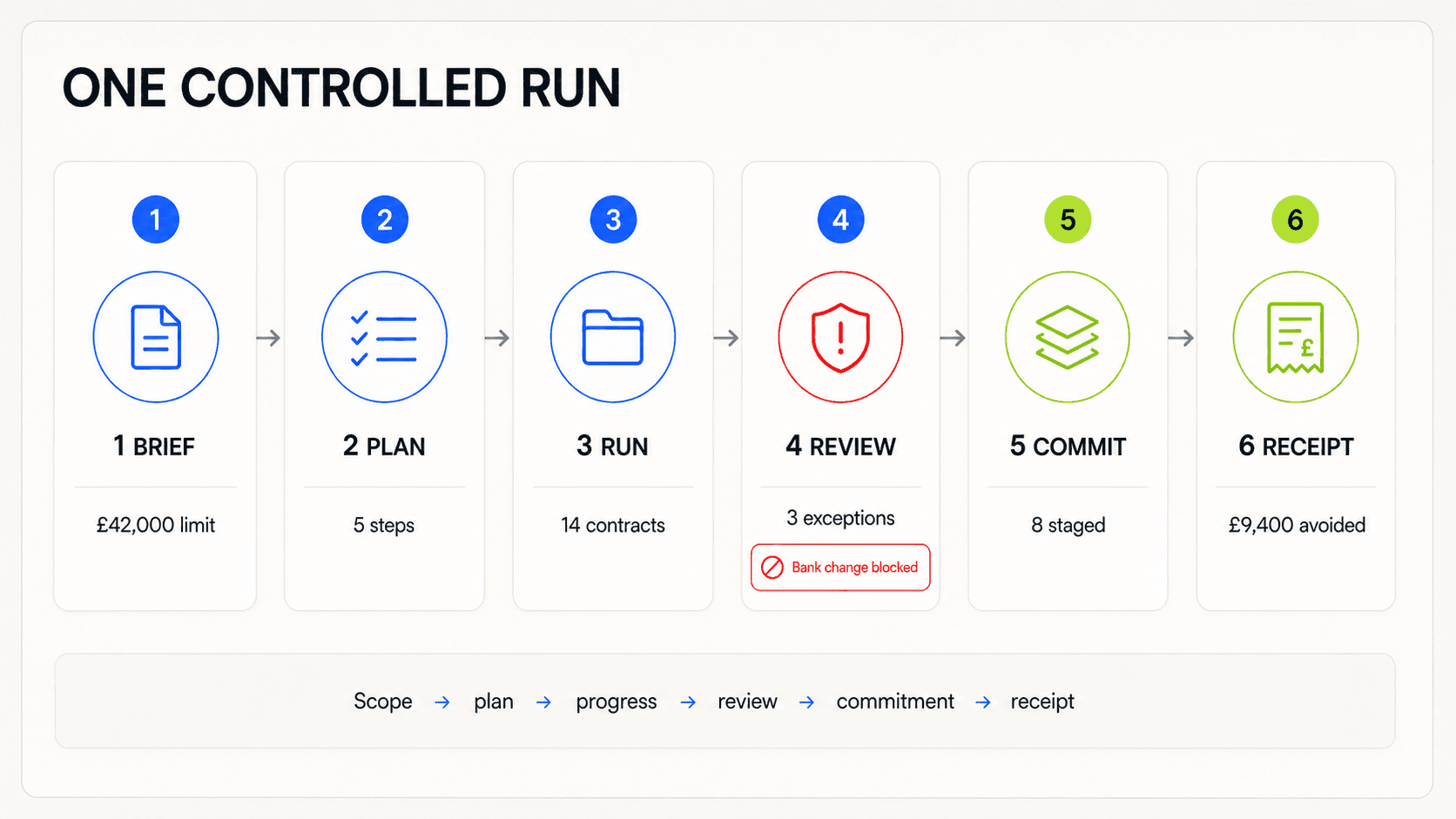
A controlled run links scope, plan, progress, review, commitment, and evidence into one understandable sequence.
No single screen makes this experience safe. The safety comes from the relationship between scope, permission, plan, execution, review, recovery, and memory.
Agentic UX anti-patterns
Some interface choices repeatedly weaken that relationship.
The magic prompt box
The product exposes no visible capability, structure, or boundary. Users learn by failing.
The autonomy theatre toggle
A setting moves from “assist” to “autonomous” without explaining which actions, systems, or approvals change.
Blanket consent
The agent asks for broad access before a specific task creates a reason for it.
The invisible plan
The system acts across several tools but reveals only a spinner and a final answer.
Chain-of-thought theatre
The interface shows a stream of model-like narration and presents it as proof that the system is correct. Plans, evidence, assumptions, and action logs are better control surfaces.
Approval without judgment
The user receives too little context, too many prompts, or no editable alternative. Approval becomes habitual clicking.
Confidence as decoration
A percentage appears without a baseline, consequence, or path forward.
Done without verification
The agent reports success because the last tool call returned, not because the requested outcome was checked.
Memory by surprise
The system changes future behaviour using information the user did not know it saved.
Dead-end failure
The agent stops and asks the user to start again, losing the plan and successful work.
Personality over clarity
Human-like language, avatars, or emotion obscure the system’s role, limits, and responsibility. Microsoft recommends keeping agents differentiated from people and using neutral, task-focused language. Microsoft, Human-centered design for agents
Chat for everything
The product forces permissions, comparisons, batch review, settings, and audit history into conversational messages that are hard to scan and easy to lose.
What to measure
Trust is not a useful product goal on its own. A person can trust an agent too much, too little, or for the wrong tasks.
Microsoft Research defines appropriate reliance as accepting correct AI output and rejecting incorrect output. Its 2024 synthesis reviewed roughly 50 papers and found that both overreliance and under-reliance can reduce human-AI performance. Microsoft Research, Appropriate reliance on Generative AI
Measure whether the interaction helps people make better decisions about delegation.
Useful measures include:
Task success: Did the requested outcome happen?
Intent correction rate: How often did users change the interpreted goal or scope?
Time to useful intervention: How quickly could a user detect and redirect a bad run?
Approval precision: Were checkpoints concentrated on actions that needed judgment?
Exception quality: Did the system surface the right unusual cases?
Recovery cost: How much time and work were needed after a failure?
Rollback success: Could the product restore the earlier state completely?
Resumption success: Could interrupted tasks continue without repeated setup?
Source verification: Could users trace important claims and decisions to evidence?
Permission comprehension: Did users understand what access they granted?
Memory comprehension: Could users predict which information would affect future tasks?
Calibration: Did users rely on the agent when it was suitable and hold back when it was not?
Cognitive load: Did visibility support judgment without flooding the interface?
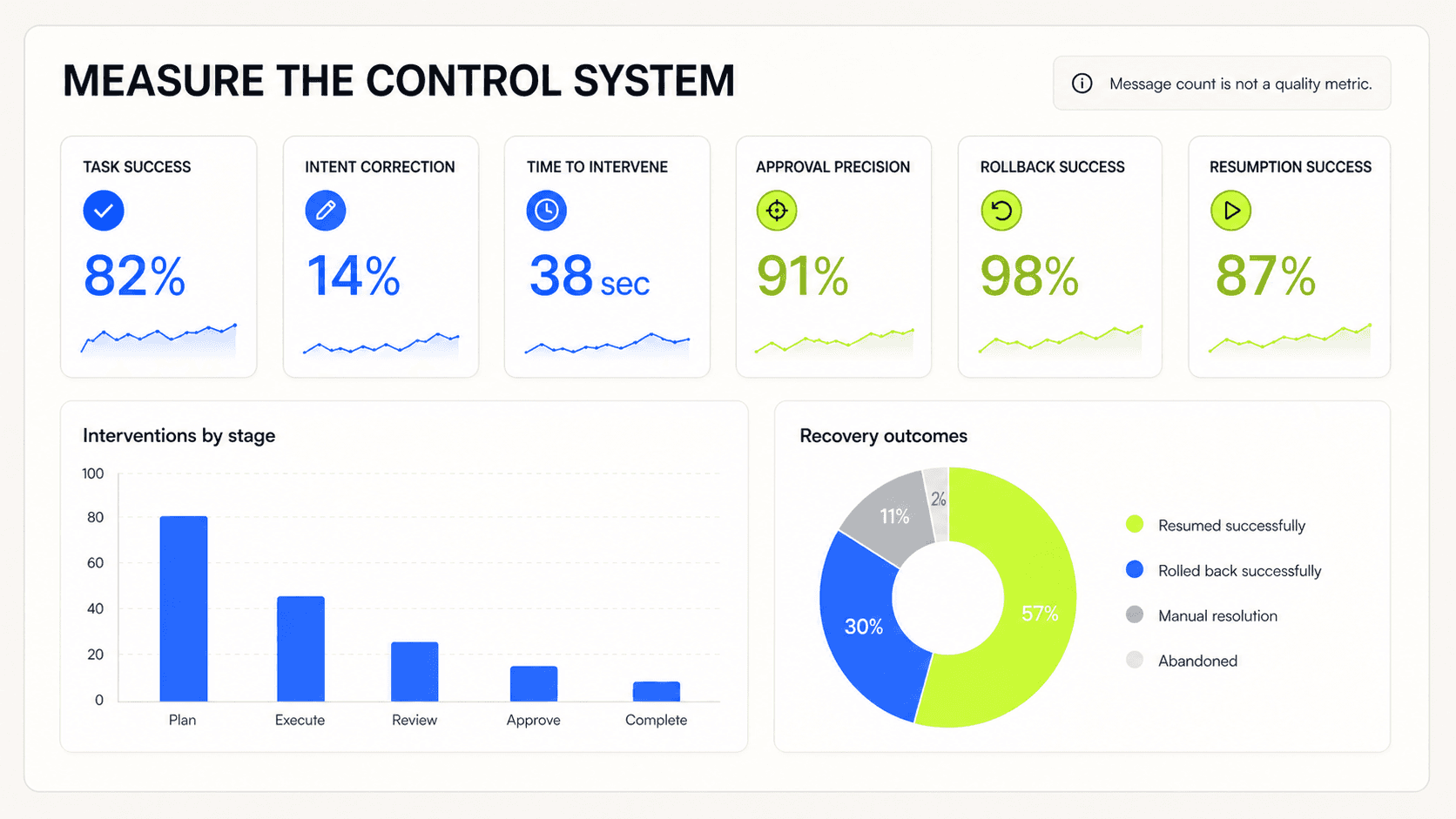
Measure whether the control system supports good decisions and recovery, not how often people talk to the agent.
Do not use engagement, message count, acceptance rate, or autonomy level as stand-ins for quality. A high approval rate may mean the agent is reliable. It may also mean the review interface has trained people to click through.
A practical checklist
Before shipping an agentic workflow, walk through one successful run, one ambiguous request, one tool failure, one unsafe request, and one partially completed task.
Then ask:
Intent
Can the user see what the agent understood?
Are important assumptions visible and editable?
Is the definition of done clear?
Boundaries
Can the user see which data, tools, accounts, and actions are in scope?
Does the agent have the minimum access it needs?
Are memory and current-task context treated separately?
Planning
Can the user preview and change the plan when it matters?
Does the impact preview describe scale, destination, and affected people?
Are multi-agent roles and handoffs understandable?
Execution
Is the current state visible?
Can the user pause, stop, or take over?
Does the action trace show meaningful events without exposing noise?
Review
Does each approval contain enough context for judgment?
Can the reviewer inspect evidence and compare changes?
Are exceptions prioritised over repetitive safe items?
Completion
Does the receipt distinguish success, partial completion, skipped work, and failure?
Is action attribution preserved?
Can another person pick up the work without reading the full conversation?
Recovery
Can users retry with a meaningful change?
Can the system undo or roll back at the right scale?
Can interrupted work resume from a safe checkpoint?
Is there a clear route to human help and incident reporting?
Learning
Does the user know what feedback will change?
Can every saved memory be viewed, edited, scoped, and deleted?
Does expanded autonomy require explicit permission?
If several answers are no, improving the model will not fix the whole experience. The interface is missing part of the operating system around the model.
The Interface Is Part of the Control System
Agentic products ask people to give software something more consequential than attention. They ask for authority.
That authority can be small, such as rearranging a draft. It can be significant, such as contacting a customer or moving money. The interface has to make the difference visible.
Good agentic UX does not try to make the agent look perfect. It creates a working relationship in which the user can understand the goal, shape the boundaries, follow the work, apply judgment, and recover when reality does not match the plan.
The most mature agent experience may feel surprisingly calm. It will not narrate every thought or ask for approval at every step. It will show the few things that help a person decide when to let the system continue and when to step in.
That is the design challenge. Not removing the human from the loop, but designing a better loop.

