
Memory turns one interaction into a future decision
Imagine telling an AI assistant that you prefer short project updates.
The next morning, it summarises a long document in five lines. Helpful.
Two weeks later, it turns a sensitive research report into the same five-line format and sends it to a stakeholder. The preference was remembered. The context was not.
This is the awkward thing about AI memory. It can remove repetition and make a product feel more attentive. It can also carry an old instruction into the wrong task, use personal context where it does not belong, or make a choice that nobody realised would persist.
The design problem is bigger than storage. Memory changes future behaviour.
A remembered preference may affect what the system recommends, which source it trusts, how it writes, which tool it chooses, or whether it acts without asking. That makes memory part profile, part permission, and part control surface.
Microsoft describes persistent agent memory as both high-value data and a control plane because stored information can influence later actions. Its guidance recommends confirming intent before memory is written, recording provenance, checking relevance and freshness when memory is retrieved, and giving people view, edit, and delete controls. Microsoft, Manage memory safety in agentic systems
That is a useful technical foundation. The UX question is what those protections should feel like to the person using the product.
This guide offers 24 patterns for making AI memory visible, understandable, correctable, and appropriately temporary. They are not a checklist to apply at full strength everywhere. A recipe assistant and a clinical decision tool need different levels of friction. The patterns give teams a shared language for deciding what should persist, where it should apply, and how a person can change their mind.
What AI memory means to a user
Technical teams may discuss context windows, retrieval stores, embeddings, profiles, summaries, or long-term state. Users usually experience something simpler:
I told the product something before, and it used that information again.
That apparently simple experience can come from several different systems. The distinction matters because each one creates a different expectation.
Session context
This is information used inside the current conversation or task. It helps the system follow references, remember an earlier instruction, and avoid asking the same question twice.
The expected boundary is usually clear: when the session ends, the context ends. Problems begin when a product quietly promotes session context into durable memory.
Project memory
This is information retained inside a named piece of work, such as a research project, client account, trip plan, or code repository.
Project memory can include goals, decisions, selected sources, preferred formats, and unresolved questions. Its value comes from having a visible container. The user can understand why the information applies here and not everywhere else.
Personal memory
This includes preferences or facts intended to follow a person across tasks: preferred language, accessibility needs, dietary requirements, communication style, or working hours.
Personal memory can be convenient, but its scope is broad. A preference that makes sense for one type of task may become a bad default for another.
Shared organisational memory
This includes team conventions, company policies, approved terminology, client facts, or knowledge available to more than one person or agent.
The key question changes from “Does the system remember?” to “Whose memory is this, who can change it, and which agents may use it?”
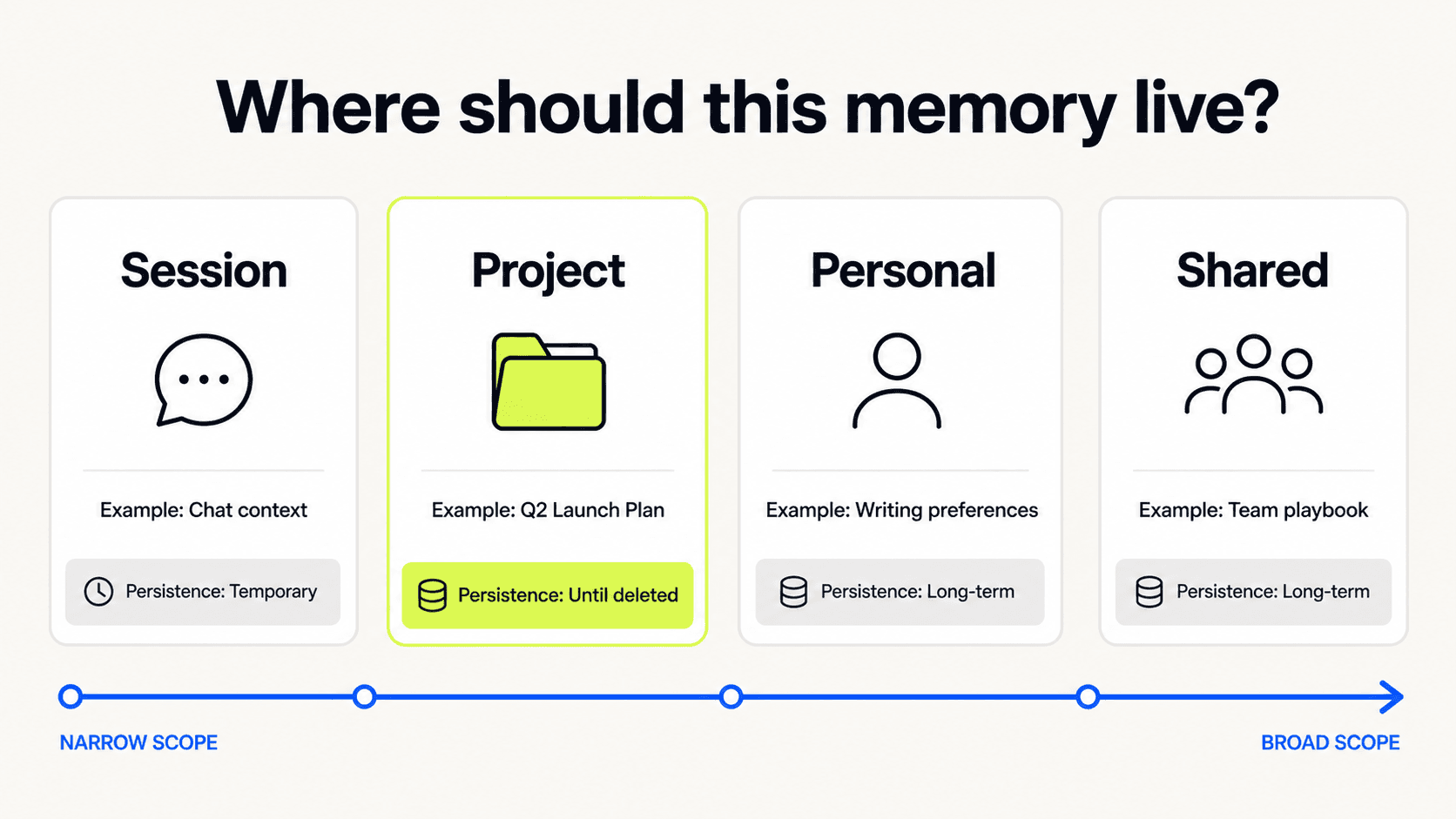
Session, project, personal, and shared memory create different expectations of persistence and ownership.
These four types can exist in one product, but they should not blur together. A user needs to know whether a correction affects this answer, this project, every future task, or an entire team.
The memory contract
The most useful mental model I have found is a memory contract.
Every remembered item should answer six questions:
What is being remembered?
Why is it useful?
Where will it apply?
Where did it come from?
How long will it last?
How can it be changed or removed?
If the product cannot answer those questions, the user is being asked to trust a hidden process.
The contract does not need to appear as a legal-looking form. It can be a compact confirmation, an inline source label, a project badge, or a memory drawer. What matters is that the information remains available when it becomes relevant.
I would design the lifecycle as eight connected states:
Notice a potentially useful detail.
Propose what the system thinks it means.
Confirm whether it should persist.
Save it with source, scope, and duration.
Apply it only when relevant.
Explain its influence at the point of use.
Correct it without starting over.
Expire or delete it properly.
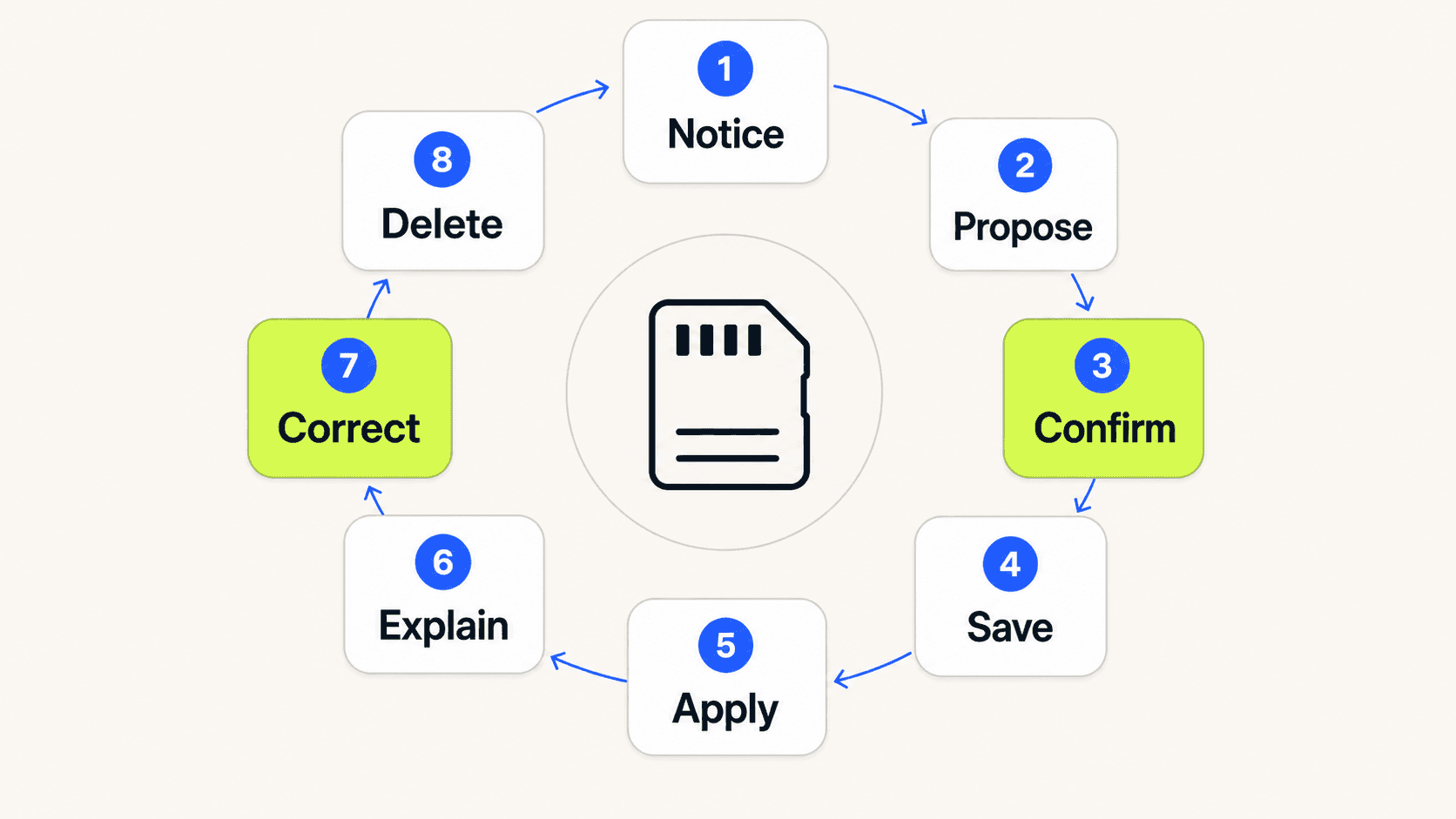
Memory is a lifecycle, not a save button.
The rest of this guide follows that lifecycle.
Capture and Consent
Before memory is saved
The first design responsibility is to separate what was said from what should persist.
People think aloud. They explore options, paste temporary data, quote other people, and change their minds. A sentence appearing in a conversation does not automatically make it a reliable preference.
Pattern 01 · Memory boundary
State the default boundary before the system starts learning from behaviour. Tell the user whether the product remembers within this session, this project, or across their account.
This is best introduced in context, not buried in a privacy policy. A short line near the first relevant interaction is often enough: “This project remembers decisions and source preferences. Personal details are not saved unless you ask.”
Google PAIR recommends setting expectations about how an AI product changes over time and explaining which signals are used for personalisation. Google PAIR, Mental Models
Pattern 02 · Current instruction or future preference
When a statement could be interpreted either way, make the distinction explicit.
“Keep this short” may describe the current response. “I prefer short weekly updates” is more likely to be a future preference. The interface can offer a small follow-up choice:
Apply once
Use for this project
Remember for future updates
Do not make people learn special phrases such as “remember that” just to control persistence.
Pattern 03 · Proposed memory preview
Show the interpretation before saving it.
The user may have said, “I usually avoid meetings before ten.” The system might propose: “Preferred meeting hours: 10:00 to 17:00, Monday to Friday.” That translation should be visible and editable because it adds structure the user did not state directly.
The preview is especially useful when the system compresses several conversations into one memory or infers a rule from repeated behaviour.
Pattern 04 · Value explanation
Explain what saving the memory will improve.
“Remember this” is a request for trust. The product should provide a concrete return: fewer repeated questions, better scheduling suggestions, consistent document tone, or preservation of a project decision.
Avoid vague promises about a more personalised experience. Tell people what will actually change.
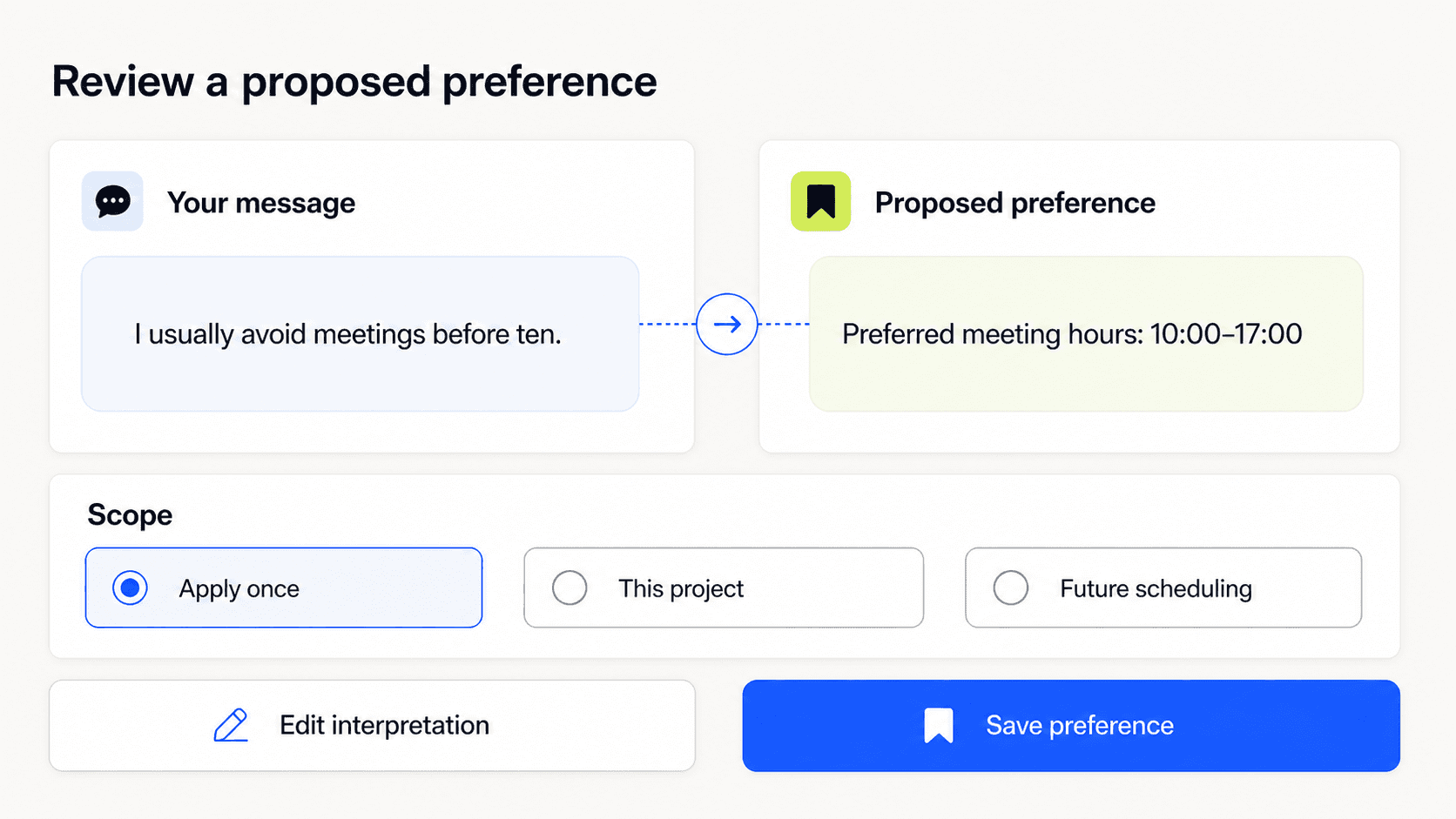
The user should be able to inspect the system’s interpretation before it becomes a future default.
Save memory with clear limits
Once the user decides that something should persist, the product needs to make the boundary durable too. A consent moment is weak if the saved memory later loses its source, scope, or expiry.
Pattern 05 · Scoped consent
Ask for consent at the level where the information will be used.
Do not bundle “remember my writing style in this project” with “use my conversations to personalise every product.” Those are different choices with different consequences.
Scoped consent is easier to understand because it connects the decision to a visible container: this document, this client, this agent, this workspace, or all future tasks.
Pattern 06 · Provenance label
Record where each memory came from and show that source when it helps the user judge reliability.
Useful provenance can include:
directly saved by the user
inferred from repeated choices
imported from a profile
copied from a project document
added by a teammate
generated by another agent
Microsoft’s memory-safety guidance recommends recording source, identity, timestamp, and model version for memory entries. The interface does not need to expose every technical field all the time, but the product should preserve enough information to explain and audit what happened.
Pattern 07 · Expiry by default
Not every useful detail deserves permanent storage.
A deadline, temporary injury, travel location, draft project name, or current campaign message may be correct today and misleading next month. Offer sensible durations such as “until this task ends,” “for 30 days,” or “until the project is archived.”
If permanent memory is available, it should be a deliberate option rather than the quiet default.
Pattern 08 · Sensitive-memory gate
Treat health, finance, identity, credentials, private relationships, and other sensitive details differently from ordinary preferences.
The safer pattern is to avoid inferring sensitive memory. If retaining it has a clear user benefit, require an explicit request and explain the scope. Some data should never enter memory at all, including passwords, payment credentials, access tokens, and secret keys.
This is one place where good UX and security need to be designed together. A warm confirmation message cannot compensate for weak data boundaries.
Pattern 09 · Memory receipt
Confirm what was saved without interrupting the task.
A lightweight receipt can say: “Saved to Project Atlas until 30 September” with Edit and Undo actions. The receipt creates a brief correction window and teaches the memory model through use.
The confirmation should name the scope. “Got it, I’ll remember” sounds natural but leaves the important part unresolved.
Memory in Use and User Control
Show memory when it affects the experience
Memory should not disappear after it is saved. The moment of retrieval is often more important than the moment of capture because that is when an old detail changes a current result.
Pattern 10 · Memory-in-use indicator
Show when remembered information materially influences an answer, recommendation, or action.
This does not need to become a permanent badge on every response. Use it when the memory changes the outcome in a way the user might reasonably question.
For example: “Used your Project Atlas writing preferences” or “Avoided morning times based on your scheduling preference.”
Pattern 11 · Influence explanation
Let the user inspect which memories mattered and how they affected the result.
OpenAI’s memory controls, for example, let people inspect sources used to personalise a response and open an explanation of why a memory was used. OpenAI, Memory FAQ
The explanation should connect source to effect. A list of memory IDs is not useful. “Used your preference for concise executive updates, so this summary is five bullets” is.
Pattern 12 · Relevance check
Treat memory as a candidate, not a command.
A remembered preference may be correct and still irrelevant. “Use a friendly tone” may work for a team update and fail for a formal complaint. The product should consider task, audience, risk, and recency before applying memory.
When relevance is uncertain and the effect is significant, ask. A small clarification is cheaper than confidently applying the wrong default.
Pattern 13 · Conflict resolution
Show when current instructions conflict with a stored preference.
The current request should usually win, but the user may want to update the future preference too. A useful prompt is: “You asked for a detailed report, but your saved preference is concise summaries. Use detailed for this report only, or update the project preference?”
Hidden conflict resolution makes the system feel inconsistent. Visible resolution teaches the hierarchy.
Pattern 14 · Freshness signal
Show age when it affects confidence.
“Added eight months ago” is more useful than presenting every memory as equally current. For time-sensitive facts, the system may need to confirm, refresh from an approved source, or stop using the memory.
Recency is not the same as truth. A new memory can still be wrong. It is one signal that helps both the system and the user judge whether the detail deserves attention.
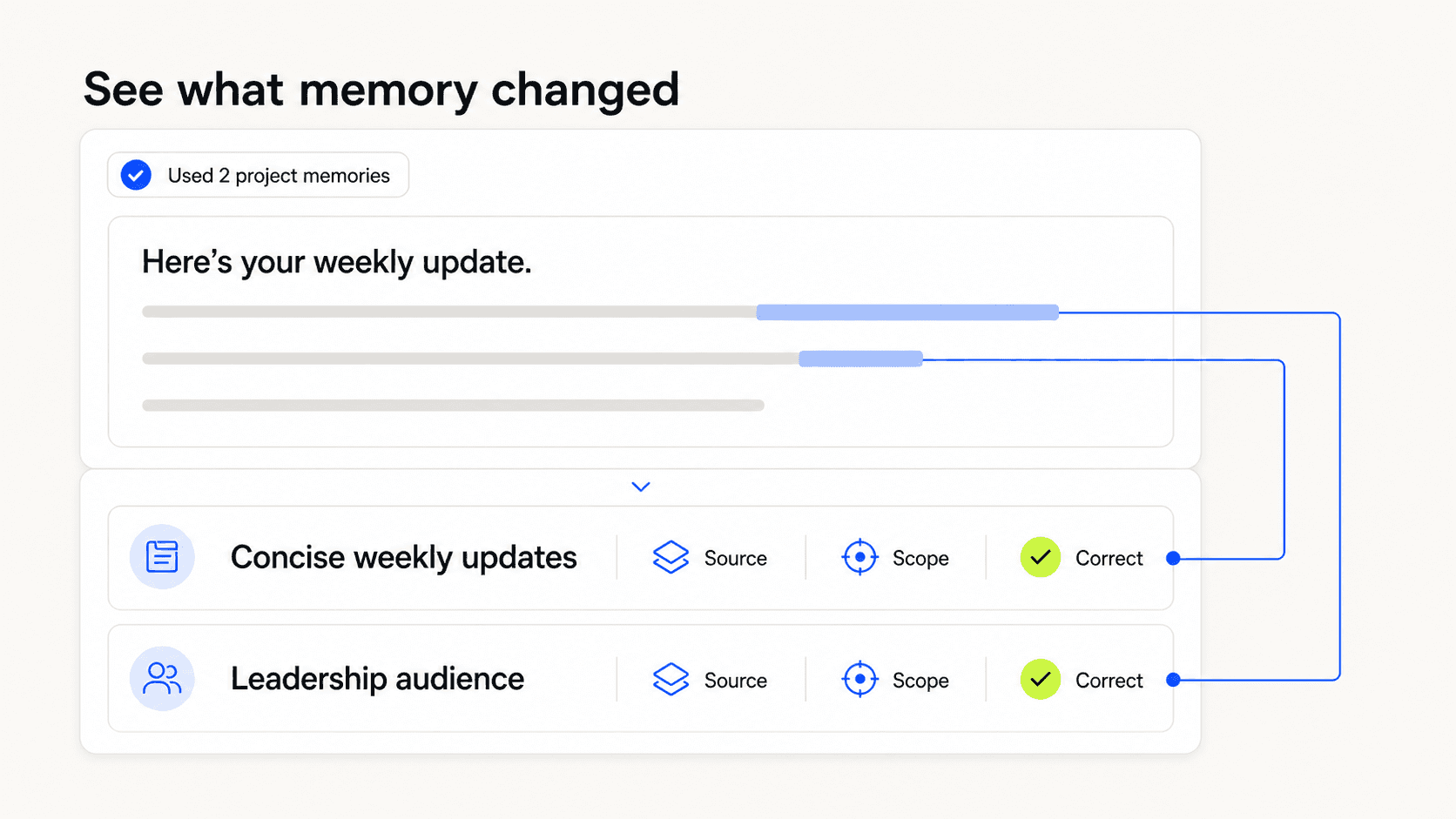
Memory becomes trustworthy when people can see how it changed the current result.
Make correction and forgetting real
People’s circumstances change. So do projects, policies, preferences, and language. A product that learns but cannot unlearn will eventually become less useful.
Google PAIR recommends letting users adjust prior feedback, erase previous selections, and reset a system to a non-personalised state. Google PAIR, Feedback and Control
Pattern 15 · Memory centre
Provide one place where people can review what the product remembers.
Organise memories by scope and purpose rather than exposing one long technical list. Useful groups might include personal preferences, active projects, shared team rules, and recently expired items.
Search, sort, and filters become important as memory grows. A memory centre is not just a settings page. It is the user’s map of how the product has adapted.
Pattern 16 · Inline correction
Let people correct memory where the problem becomes visible.
If an answer says, “Since you work in London,” the user should be able to change or remove that detail without leaving the task. The correction can then update the underlying memory, not just regenerate the current response.
Ask whether the change applies once or should update the saved memory. That distinction prevents an exception from rewriting a useful rule.
Pattern 17 · Pause without deleting
Offer a temporary mode that neither reads nor writes personal memory.
This is useful for borrowed devices, sensitive tasks, surprise planning, client work, or any moment when the user wants a clean context. The mode should state both sides of the boundary: existing memory will not be used, and new memory will not be created.
Pattern 18 · Granular and bulk deletion
Support deleting one memory, a group, a project, or everything.
Granular deletion helps with a single incorrect preference. Bulk deletion helps when the user leaves a role, closes a project, or no longer trusts the memory model. Both matter.
Deletion language needs to match the system’s real behaviour. If removing a saved memory does not remove its original chat, copied project data, or audit record, explain that clearly. OpenAI’s documentation, for example, distinguishes saved memory from chat history and explains that complete removal can require deleting both the memory and its source conversation.
Pattern 19 · Reset and rebuild
Give users a clear way to return to a non-personalised baseline.
Reset is different from turning memory off. Turning it off stops future use. Reset addresses what has already been learned or stored.
For complex systems, consider a preview: what will be removed, what will remain for legal or security reasons, which projects are affected, and whether the action can be reversed for a short period.
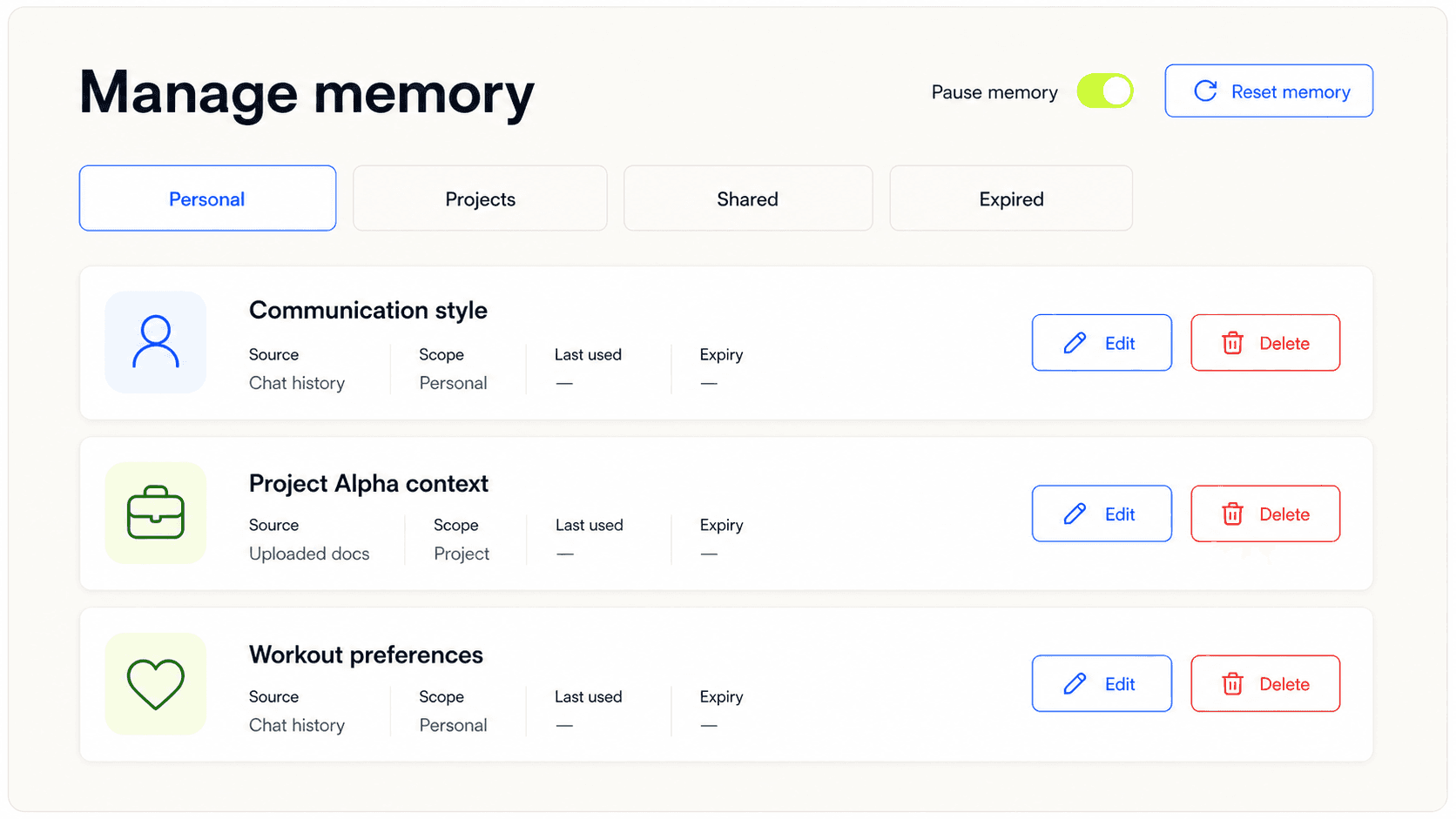
Memory controls should support everyday correction as well as a complete reset.
Shared Memory and Failure Modes
Design shared memory as a permissions problem
Personal assistants can make memory feel like a conversation between one person and one system. Agents used at work are rarely that simple.
A project may include several people, multiple agents, connected tools, and documents with different access rules. Shared memory needs explicit ownership because a useful team convention can also expose private context or spread an error across many tasks.
Pattern 20 · Named memory owner
Show who owns a shared memory and who is responsible for keeping it current.
Ownership might sit with a person, a team, a role, or an approved source of truth. “Company preference” is not enough if nobody can answer who may change it.
Pattern 21 · Access map
Make it possible to see which people, agents, and tools may read or write each memory space.
The access map should follow actual permissions, not an AI-generated promise. Microsoft recommends architectural isolation by user, agent, and tenant, with access limited to the memory each agent needs.
For a user, the practical view may be simple: Agent A can read project decisions; Agent B can read and suggest updates; only project owners can approve changes.
Pattern 22 · Shared-memory proposal
Do not let one person’s correction silently become everybody’s rule.
When a user wants to change shared memory, create a visible proposal with the old value, new value, reason, affected projects, and required approver. Small teams may approve immediately. Larger or regulated organisations may need a review workflow.
Pattern 23 · Handoff provenance
Preserve source and scope when one agent passes memory to another.
An agent should not receive “The client wants daily updates” without knowing whether that came directly from the client, from an internal note, or from another agent’s guess. Each handoff should keep enough provenance to judge reliability and trace mistakes.
Pattern 24 · Propagation preview
Before changing or deleting shared memory, show where the effect will travel.
The preview might list three active agents, two scheduled workflows, and seven project templates that use the memory. This helps the user understand impact before confirming the change.
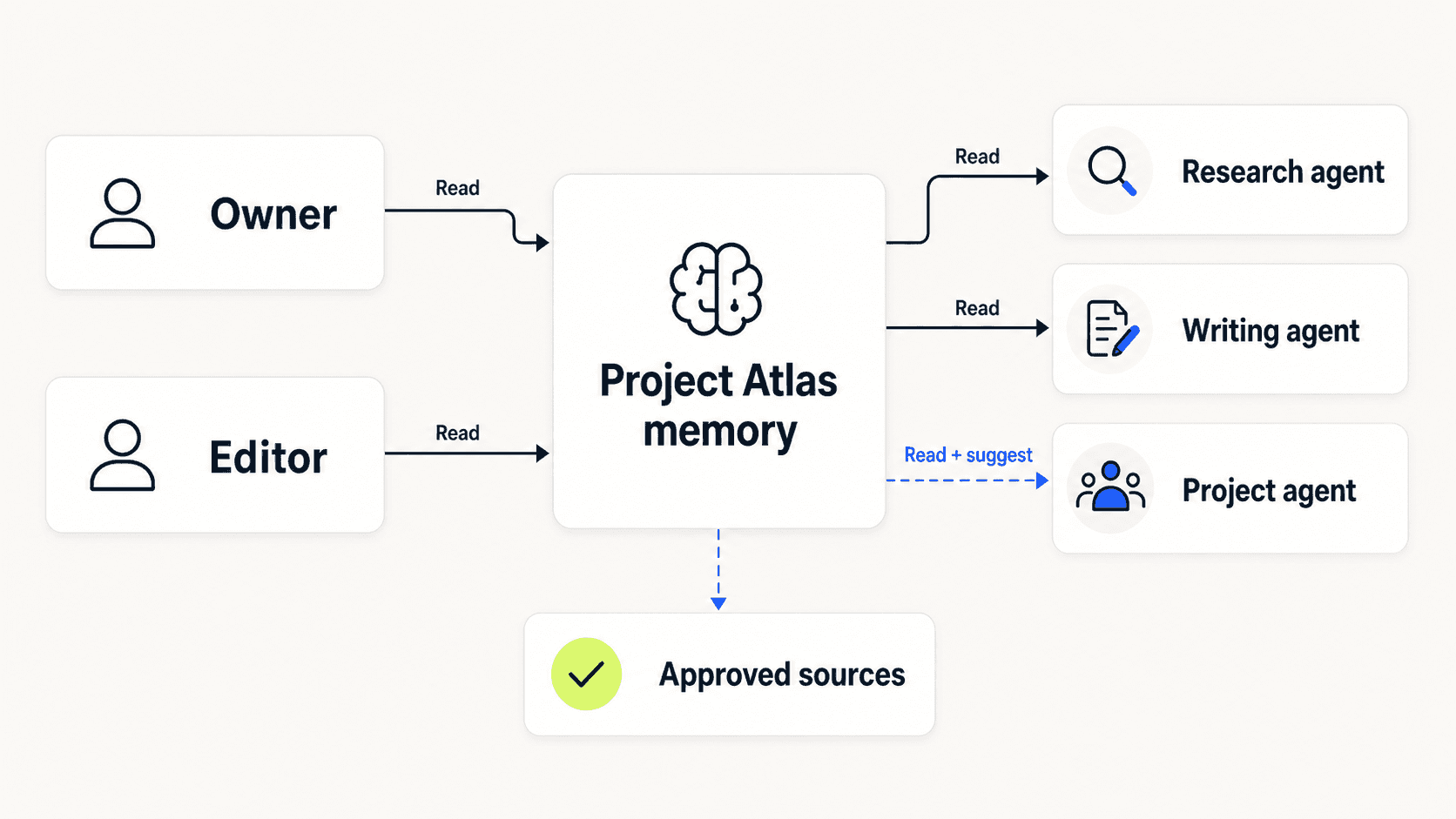
Shared memory needs visible ownership, access, and handoff provenance.
Common memory failure modes
Most memory problems are not caused by a missing settings page. They come from a gap between the system’s boundary and the user’s expectation.
Surprise memory
The product recalls something the user did not expect to persist. The detail may be accurate, but its return feels intrusive because capture was invisible.
Fix the boundary and receipt, not just the wording of the response.
Silent personalisation
Memory changes a result without showing that it did so. The user cannot tell whether the output came from the current task, a stored preference, or a model guess.
Add an influence explanation where memory materially changes the outcome.
Overgeneralisation
A local preference becomes a global rule. “Use a casual tone in this workshop” turns into casual writing for every client.
Use narrower default scopes and make promotion to broader memory explicit.
Stale truth
The system keeps using an old role, location, deadline, policy, or preference.
Add expiry, freshness checks, and prompts to confirm high-impact details.
Cross-context leakage
Information from one client, workspace, or person appears in another context.
This is not only a messaging problem. It requires real isolation, least-privilege access, and testing across boundaries.
Confident false memory
The system presents an inference or synthesis as something the user explicitly said.
Keep the original source and distinguish direct statements from inferred preferences.
Deletion theatre
The interface says a memory was deleted, but copies, sources, indexes, or downstream agents can still use it.
Deletion must be designed across the full data path. The UI should make any retained records or separate deletion steps clear.
Shared-memory drift
Several people or agents update the same rule until nobody knows which version is current.
Use ownership, version history, change proposals, and rollback for shared spaces.
Risk and Measurement
Match the controls to the risk
There is no reason to ask for a confirmation dialog every time a music app notices that someone skips a genre. Excessive control creates work and encourages people to click through without reading.
The amount of friction should depend on five things:
Sensitivity of the information.
Breadth of the scope.
Duration of the memory.
Consequence of being wrong.
Number of people or agents affected.
A low-risk preference might be saved with a subtle receipt and easy undo. A health detail used across an account may need explicit consent, a narrow purpose, clear expiry, and a visible place to review it. A shared policy that controls financial actions may need an owner, approval, version history, and an audit trail.
NIST’s Generative AI Profile is deliberately broader than memory UX, but its lifecycle approach is useful here: risk should be understood, measured, managed, and governed across the product, not handled by one warning at the moment of use. NIST, AI RMF Generative AI Profile
The design goal is not maximum friction. It is proportionate clarity.
What to measure
Memory quality cannot be measured by storage volume. More saved details may mean more convenience, or it may mean the product is collecting noise.
I would track a mix of usefulness, comprehension, control, and harm.
Task value
Does memory reduce repeated setup, improve relevant outputs, or help people complete work faster without creating more correction?
Compare memory-assisted tasks with a clean baseline. Do not assume personalisation is valuable simply because it is present.
Correction rate
How often do users edit a memory after it affects an output?
A high rate can reveal poor inference, overly broad scope, or stale information. A very low rate is not automatically good; controls may be too hidden to use.
Surprise rate
How often do people report, undo, or question unexpected recall?
Qualitative research is useful here. Ask users what they thought would persist before showing them the actual memory model.
Scope comprehension
Can people correctly predict whether a memory applies once, within a project, across an account, or across a team?
This is a strong usability-test question because it checks the mental model rather than preference for the interface.
Stale-memory incidents
How often does old information cause a wrong suggestion or action? Track the age, source, scope, and consequence of each incident.
Control success
Can users find, edit, pause, and delete memory? Does the change affect future behaviour as expected?
Test the whole loop. A visible delete button is meaningless if the deleted detail still appears in the next task.
Boundary failures
Monitor cross-user, cross-project, cross-agent, and cross-tenant leakage. These failures should be treated as security and trust incidents, not normal personalisation errors.
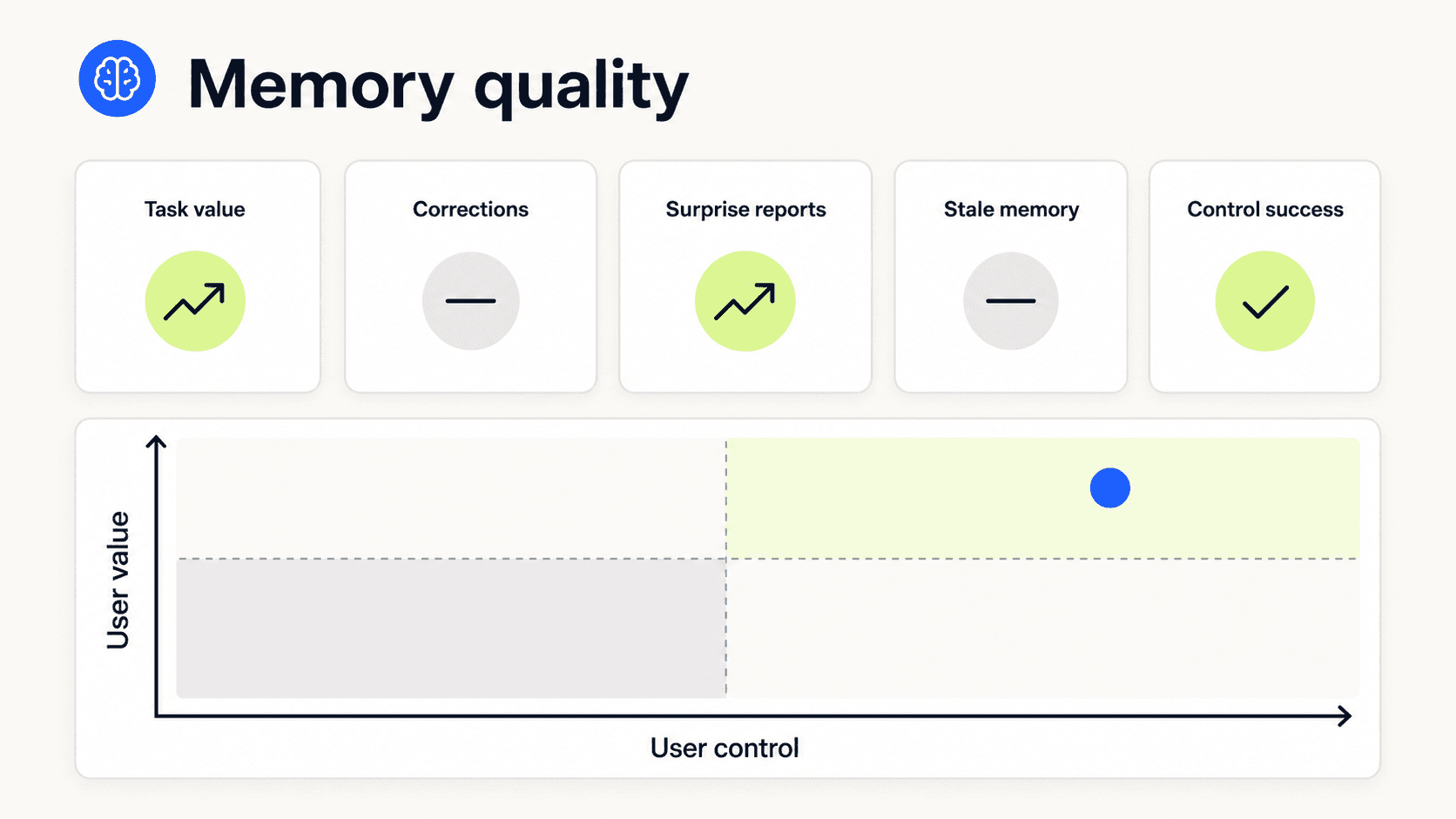
Measure whether memory helps people and whether they can understand and control it.
A Practical Memory Review
Use these questions during product definition, design critique, and release review.
Purpose
What user problem becomes easier because this information persists?
Could the same value be delivered with session or project context instead?
Are we saving a fact, preference, decision, instruction, or inference?
Capture
Does the user know that memory is on?
Can they distinguish a one-time instruction from a future preference?
Do we preview inferred or summarised memory before it has a broad effect?
Are sensitive details blocked or handled with explicit consent?
Scope and provenance
Is the memory tied to a clear user, project, agent, or organisation?
Can we show where it came from?
Can the system distinguish direct user input from inference?
Does memory expire when its useful life ends?
Use
Do we check relevance and freshness before applying memory?
Can the current instruction override a stored preference?
Do we explain memory when it materially changes the result?
Can the user correct it at the point of use?
Control
Can users review, edit, pause, delete, and reset memory?
Does deletion work across every place that can still influence behaviour?
Are retained audit records or source conversations explained clearly?
Is there a safe fallback that does not depend on personalisation?
Shared systems
Who owns each shared memory space?
Which people and agents can read or write it?
Are changes reviewed at the right level of risk?
Can we trace and reverse propagation across agents and workflows?
Memory Should Earn the Right to Persist
AI memory is often presented as a natural step toward a more capable assistant. I think that framing skips the harder question.
What deserves to follow a person into the future?
Some information clearly does. A preferred language, an accessibility need, or a project decision can remove genuine effort. Other details are useful only once. Some should remain inside a project. Some should never be remembered.
The product needs to make those differences visible.
Good memory UX does not ask people to manage a database every time they speak. It creates clear boundaries at the moments that matter: before a detail persists, when it changes an outcome, when it becomes stale, and when the user wants it gone.
The test is simple. A person should be able to answer:
What does this product remember about me?
Why did it use that memory here?
Where else will it apply?
Can I correct or remove it?
If those answers are hard to find, the system is not really remembering with the user. It is remembering around them.

