ONGOING PROJECT
Turning a fragmented property billing process into one system the team can run and trust
Internal tool · Product design and build

01 · CONTEXT
The business wanted to grow, but every new property meant more disconnected work
Majella Properties relied on a 12-year-old Access database for billing, then moved information through CSV exports, PDF creation, manual email and separate payment tracking. The team wanted one system that could support the current portfolio and eventually bring its other property companies into the same operation.
I joined as the sole product designer and builder. I owned the stakeholder research, workflow mapping, legacy-system audit, information architecture, interface design, coded prototype, testing and ongoing build.
Role
Sole Product Designer & Builder
Stakeholders
Owner, manager and bookkeeper
Timeline
July 2026 to present
Status
Building and testing
First rollout
Majella’s 52 commercial units
Tools
Claude Design, Cowork and Code
Designed for the first rollout, structured for more organisations
The current build focuses on Majella. The data model and organisation switcher are prepared for future expansion, but the client’s other property companies have not been migrated yet.
02 · THE PROBLEM
The problem was bigger than an old database
The calculation logic was invisible, but the work around it was equally costly. Staff could produce invoices without seeing why each figure was correct, then had to move the result through several manual tools before the month was complete.
Invisible calculation logic
No screen explained a figure, showed a change history or warned the team when an allocation was wrong.
A fragmented monthly operation
Database work, exports, documents, email and payment tracking lived in separate steps and systems.
THE WORKFLOW I OBSERVED
01 · Access database
Generate billing without seeing the calculation
02 · CSV export
Move the output into another file
03 · PDF creation
Turn exported data into tenant documents
04 · Manual email
Send each document through a separate step
05 · Payment tracking
Work out who had paid outside the billing flow
06 · Accounting handoff
Move records into the accounting process
Where visibility broke
Access database
Billing logic lived where only one operator could see it.
Export chain
CSV files became PDFs before anything could be sent.
Manual tracking
Email delivery and payment status were checked separately.
The workflow moved forward, but status and responsibility disappeared between tools.
HOW MIGHT WE
Help a non-technical property team run, check, correct and send billing from one place, without needing to understand the legacy database?
03 · RESEARCH AND REFRAME
I started by sitting beside the people who run the process
I interviewed the owner, manager and bookkeeper, watched how they completed the monthly cycle and mapped the handoffs, delays and workarounds. I also inspected the Access database, traced the billing rules and compared reconstructed outputs with historical invoices and VAT records.
Contextual observation
Shadowed real monthly work and noted where people stopped, switched tools or relied on memory.
Stakeholder interviews
Spoke with the owner, manager and bookkeeper about responsibility, risk and exceptions.
Workflow and IA mapping
Mapped recurring billing, documents, corrections, tenant records and governance.
Database and data audit
Traced legacy rules, inspected records and checked reconstructed results against issued invoices.
How four kinds of evidence converged
Work as observed
Stakeholder language
Handoffs and rules
Records and billing logic
One operating problem, seen from four angles
Hidden rules, fragmented handoffs and risky exceptions all pointed to the same need: one visible system of record.
The database was not simply broken. The team had no safe way to understand or operate it.
The reconstructed engine matched the selected historical electricity run, but the audit also exposed a live 133.33% zone allocation. The product challenge became visibility, control and recovery, not a cosmetic replacement of the old interface.
04 · INFORMATION ARCHITECTURE
One place for recurring work, records and control
I separated frequent monthly tasks from configuration. The biller sees the work that is due. Settings and audit history stay available without crowding the main path.

The first rollout is Majella. Multi-organisation onboarding, live Xero connection and the AI assistant remain later stages, not current product outcomes.
05 · FLAGSHIP FLOW
I designed the difficult month, not only the happy path
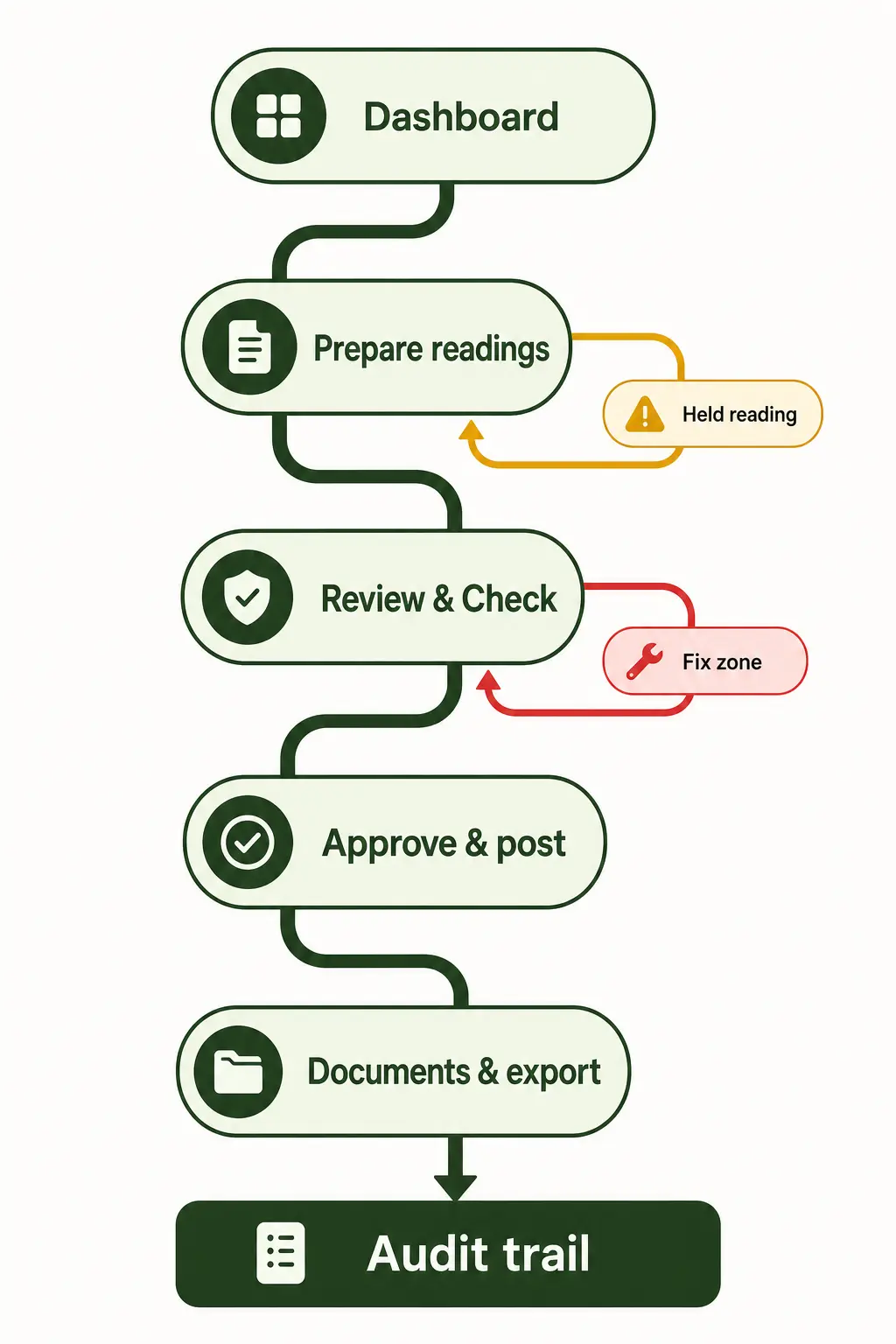
Electricity billing carries the most risk, so I used it to define the shared pattern for every billing run. Problems interrupt the flow only when they are real, and every warning links to a clear recovery action.

06 · PRODUCT DECISIONS
The controls had to fit the way the business actually works
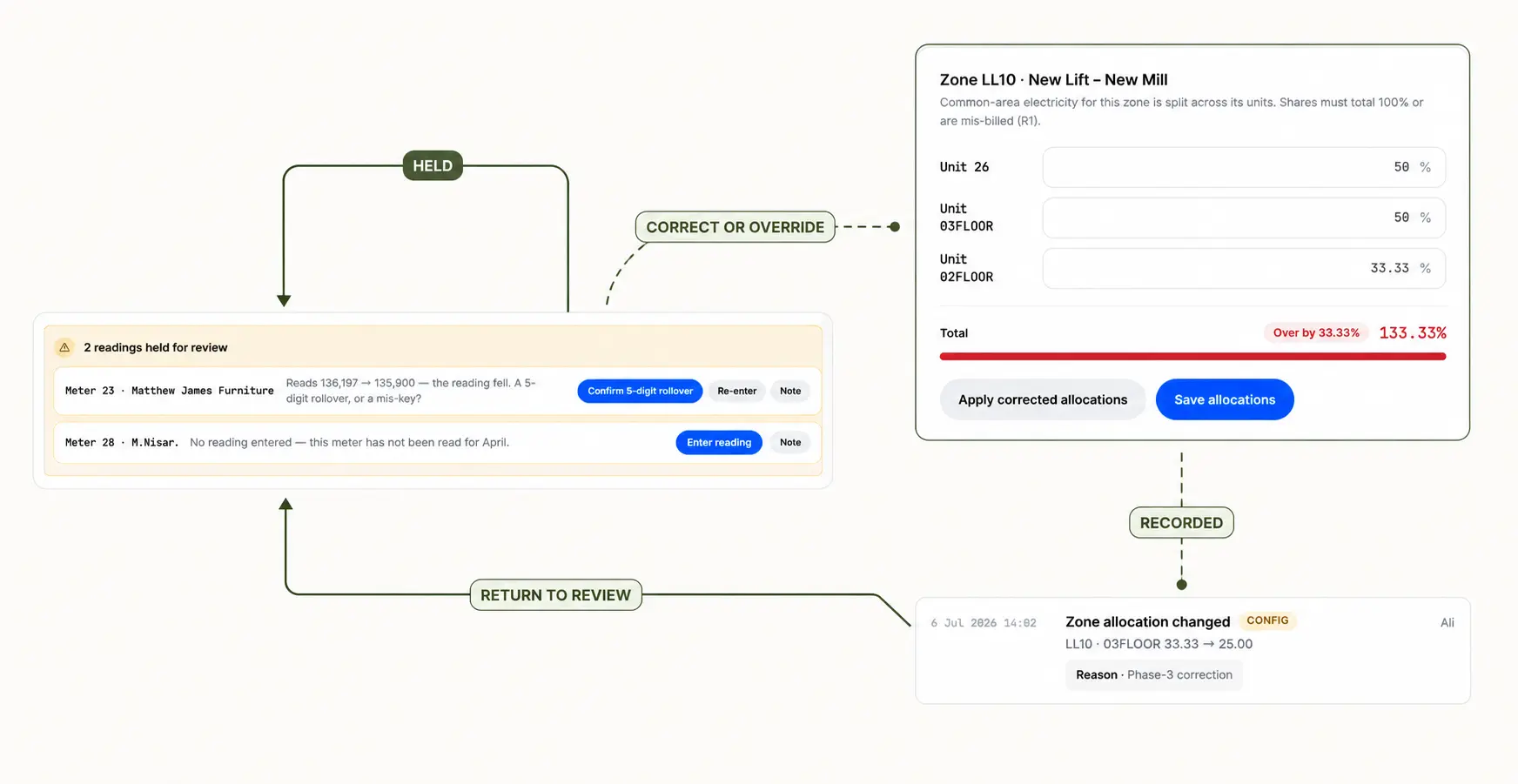
The legacy system hid important choices inside calculations. I turned those choices into visible product decisions so the team can understand what happened and recover when something is wrong.
Name the landlord share
The product shows where a landlord or owner share applies instead of silently turning it into zero. The decision stays visible in the invoice breakdown.
Review in three passes
Summary, exceptions and invoice detail support different checks. The team can scan the month first, then investigate only the items that need attention.
THE PRINCIPLE
Make the normal path quick, but never hide the difficult month.
07 · THE PRODUCT
The coded prototype turns one monthly job into a visible sequence
These screens use anonymised portfolio names, but they run on realistic property data. The interface keeps status, checks and next actions close to the work instead of asking the user to remember what happened elsewhere.
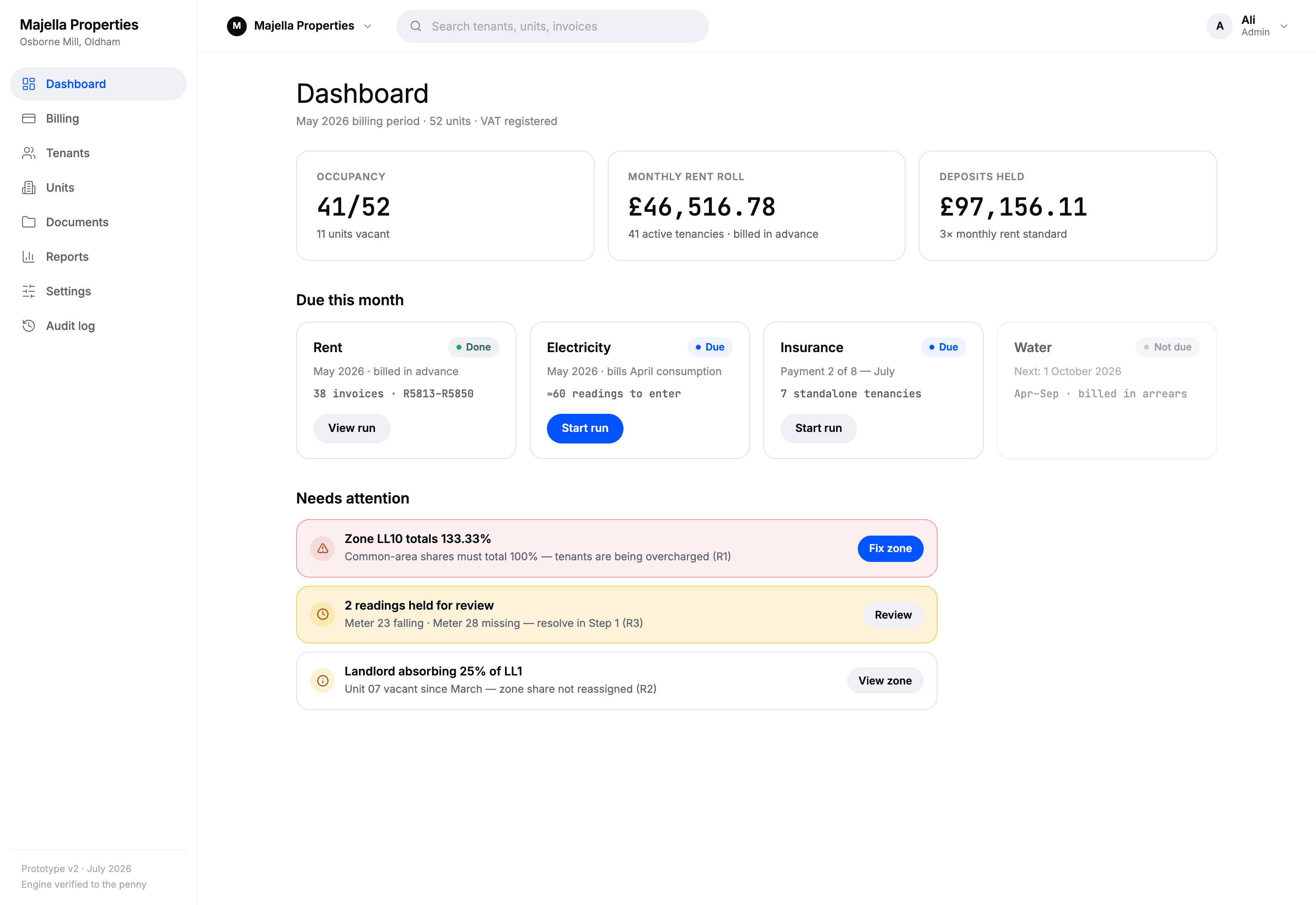
The dashboard answers three questions first: what is due, what needs attention and where should I continue?

The run keeps progress visible and separates held readings from the rest, so one problem does not erase the work already completed.

A named allocation model makes the split understandable. Invalid totals are surfaced before they affect a posted invoice.

The wording stayed close to the team’s language. Summary, exceptions and detail support quick scanning without hiding the calculation.

Tenant and unit records move out of disconnected spreadsheets and become part of the same operating system.

The audit log shows what changed, who changed it and when. It gives the owner visibility without making the monthly biller explain every step.
08 · TESTING
I tested the working prototype with the people who will use it
The owner, manager and bookkeeper worked through realistic billing tasks. I watched where the non-technical user paused, what she understood without explanation and how she recovered after a problem.
Functional coded prototype · realistic property data · portfolio names anonymised
THE TASKS
Run electricity billing
Move from readings to a prepared run without me narrating the interface.
Resolve held readings
Identify why an item stopped and decide whether to fix or override it.
Correct an allocation
Find the zone problem, update it and return to the interrupted task.
Check the output
Review totals, exceptions and invoice detail before posting.
WHAT THE FIRST ROUND CHANGED
Use “Review & Check”
The team understood this wording more quickly than accounting language such as “reconcile.”
Keep a controlled override
A strict block was too rigid for legitimate exceptions. The product now asks for a reason and records the decision.
Return people to the task
Fixing a setting is not the end of the job. The flow returns the user to the exact billing step that was interrupted.
Support scanning
Numbers, status and exceptions stay aligned in tables because this work depends on comparison, not decorative cards.
Testing is still in progress. I am refining the prototype after each round and will update this case study when the team completes the next full parallel run.
09 · WHERE IT IS NOW
Separate what is verified from what is still being tested
This is an ongoing build, so I am not presenting targets as outcomes. The evidence below reflects what the team and I have actually checked so far.
Verified
A selected May electricity run reproduced 38 of 38 invoices to the penny. The audit also exposed a 133.33% allocation, and the prototype now surfaces that condition before posting.
Testing now
Can a non-technical stakeholder complete the full cycle, understand held items and recover after a correction? The coded prototype is being refined around those tasks.
Later, not yet shipped
Live Xero integration, onboarding for multiple organisations and an AI assistant over historical records remain later-stage work.
A TARGET, NOT A RESULT
Completing the monthly billing cycle in under 30 minutes is an acceptance target for rollout. It has not yet been measured as an outcome.
10 · REFLECTION
The hardest part was not automating the happy path
It was deciding how the product should behave when the data is incomplete, the business rule has an exception or a user needs to correct work that already happened.
Exceptions are part of the product
A useful internal tool does not pretend every month is clean. It gives legitimate exceptions a controlled path and leaves evidence behind.
Visibility creates trust
People trust the result when they can see the source, the rule, the calculation and the person who approved a change.
HOW AI SUPPORTED THE BUILD
Claude helped me inspect legacy code and move faster while prototyping and building. I carried out the research, made the product decisions, tested the work with stakeholders and remain accountable for the result.